
10 VSS Content
When Step 3 runs, a checkbox dialog appears to let the user choose which data to include in the VSS:
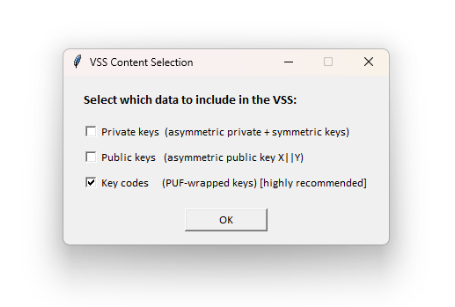
Behavior:
| Checkbox | When Checked | When Unchecked |
|---|---|---|
| Private keys | Asymmetric private keys and symmetric keys are included in VSS | Omitted (private/symmetric keys are not available in the VSS page) |
| Public keys | Asymmetric public key is included | Omitted (public keys are not available in the VSS page) |
| Key codes | PUF-wrapped key codes are included | Omitted (keys cannot be unwrapped on device) |
Special rule: The signing key (slot 2, first asymmetric key) is always emitted with both private and public key regardless of checkbox selection. This is required because hsmsfmdgen.exe needs the full key pair to sign the FWMD and embed the public key for ROM Boot verification.
Recommended configurations:
| Scenario | Private | Public | Key Codes | Notes |
|---|---|---|---|---|
| Production (recommended) | Off | Off | On | Only key codes on device. Original keys are not stored anywhere -- the application recovers them at runtime via PUF unwrap. Strongest protection against Flash readout and cloning. Requires Step 1c. |
| Development | On | On | On | Full data for debugging. Plain keys visible in VSS alongside key codes. |
| Signing only | Off | Off | Off | Only signing key (slot 2) in VSS. No additional keys provisioned. |