
12 Troubleshooting
Common issues and solutions for the secure boot provisioning process.
Board Not Detected
Symptom: "HSMLITE not present" error in Step 1.
Solution:
-
Reset the board (press Reset button).
-
If still not detected, power cycle the device (disconnect and reconnect the DEBUG USB cable).
-
Verify both USB cables are connected (TARGET USB + DEBUG USB).
FWMDT Fails in Step 3
Symptom: "Error creating Metadata. Reset and start from Step 1."
Solution:
-
Ensure all previous steps (1, 1a, and 2) have been completed.
-
Reset the board and start from Step 1.
-
Check that the application hex file is valid and contains code at the expected address range (
0x0C000000).
PUF Key Wrap Returns Unexpected Size
Symptom: AssertionError: Unexpected key code size: N (expected 84)
Solution:
-
Ensure the board firmware is up to date. The factory kit firmware must match the expected kit-protocol version.
-
Re-run Step 1 to reprogram the factory kit firmware.
-
Then, retry Step 1a and Step 1c.
PUF AC Verification Fails
Symptom: AssertionError: PUF AC verification failed: device returned different data
This occurs when the PUF AC is loaded from file (automatic reload) and the device returns different data than what was stored.
Solution:
-
Re-run Step 1a to generate a fresh PUF Activation Code.
-
Then, retry Step 1c.
No Keys to Wrap in Step 1c
Symptom: "No keys registered. Please load keys using Step 1 or Step 1b first."
Solution: Execute Step 1 (and optionally Step 1b) before Step 1c.
Key Registry Full
Symptom: "Maximum number of keys reached" dialog in Step 1b.
Solution: The registry supports up to 10 keys (including the signing key from Step 1). To start over, restart the notebook kernel to clear the registry.
Serial Console Shows No Output
Solution:
-
Verify the COM port is correct (check Device Manager).
-
Confirm baud rate is set to 115200-8-N-1.
-
Use the DEBUG USB port for the serial connection.
-
Reset the board after opening the terminal.
Step Order Errors
Several steps have prerequisites. The required execution order is:
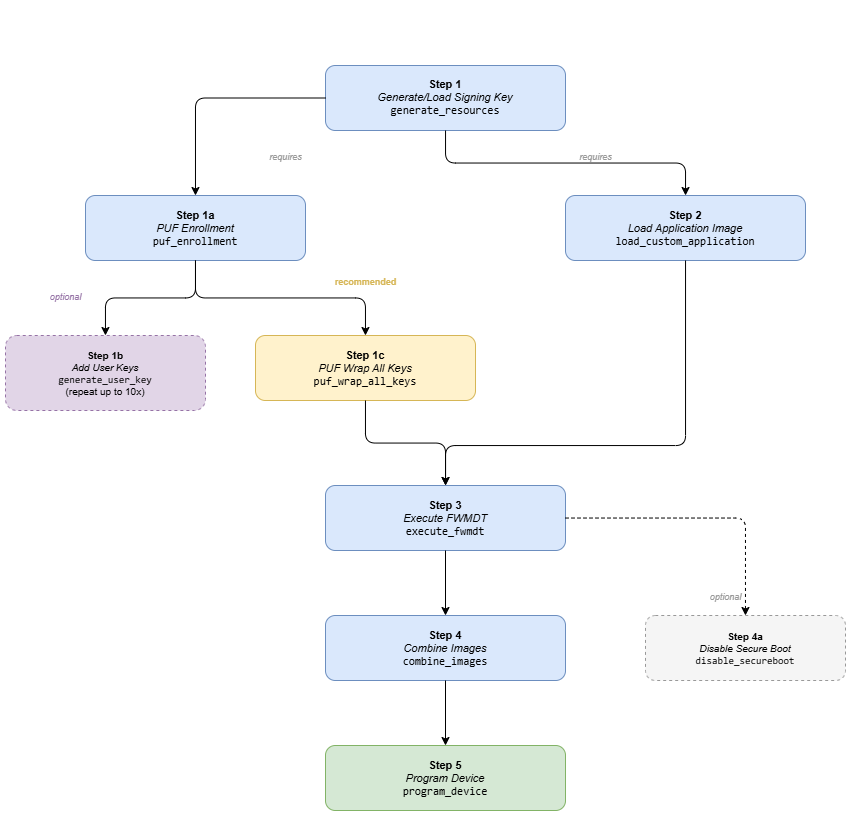
Running a step before its prerequisites will show a dialog indicating which step must be completed first.