
22.4.2.4 Counter Operations
Depending on the mode of operation, the counter is cleared, reloaded, incremented, or decremented at each TC clock input (CLK_TC_CNT). A counter clear or reload marks the end of the current counter cycle and the beginning of a new one.
The counting direction is set by the Direction bit in the Control B Set register
(CTRLBSET.DIR) and Control B Clear register (CTRLBCLR.DIR). The counter will count up by
writing a ‘1’ to CTRLBCLR.DIR bit, or count down by writing a
‘1’ to CTRLBSET.DIR. The counter will count up or down for each tick
(clock or event) until it reaches TOP or ZERO. When it is counting up and TOP is reached,
the counter will be set to zero at the next tick (overflow), and the Overflow Interrupt
flag in the Interrupt Flag Status and Clear register (INTFLAG.OVF) will be set. When it is
counting down, the counter is reloaded with the TOP value when ZERO is reached (underflow),
and INTFLAG.OVF is set.
INTFLAG.OVF can be used to trigger an interrupt, a DMA request, or an event. An overflow or underflow occurrence (i.e., a compare match with TOP/ZERO) will stop counting if the One-Shot bit in the Control B register is set (CTRLBSET.ONESHOT).
It is possible to change the counter value by writing directly in the COUNT register, even when the counter is running. When starting the TC, the COUNT value will be either ZERO or TOP (depending on the counting direction set by CTRLBSET.DIR or CTRLBCLR.DIR), unless a different value has been written to it, or the TC has been stopped at a value other than ZERO. Write access to COUNT register has higher priority than count, clear, or reload. The direction of the counter can also be changed when the counter is running. See the following figure.
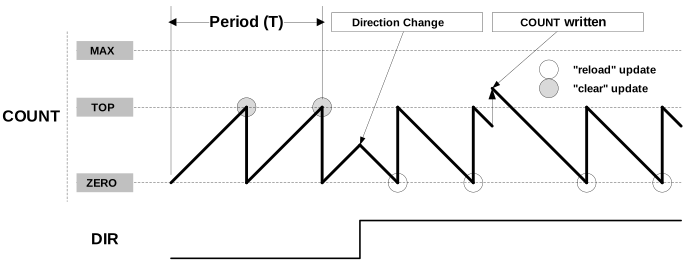
Due to asynchronous clock domains, internal counter settings are written only after the synchronization is complete.