
14.5.9 Managing Flash Bits
The FFPI Monitor supports a set of command to set, clear or get Flash bits. Three kinds of Flash bits can be managed:
- GPNVM bits
- Lock bits
- SECURITY bit (GPNVM bit 0)
All set/clear/get operations start by a CMDE command with the relevant op code, followed by one or more DATA commands carrying data. The first data carries bits [15:0], the second data carries bits [31:16], the third data carries bits [47:32], etc.
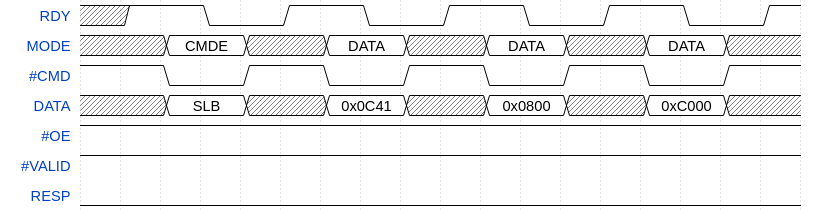
As an example, the above command sets Lock bits 0, 6, 10, 11, 27, 46 and 47 in the selected Flash bank.
Then the Get Lock Bit operation can be executed to read back:
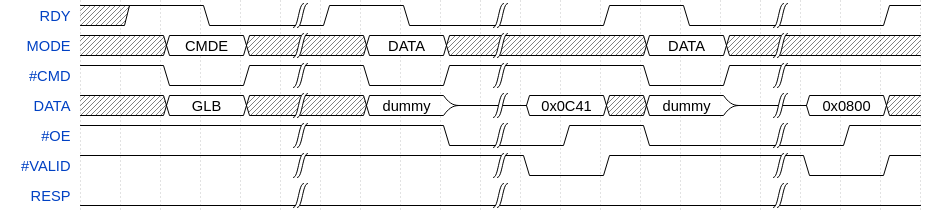
Set Bit operations only update the value of bits set in the bitmask carried by DATA commands but leave the values of other bits unchanged. Also, Clear Bit operations only update the value of bits set in the bitmask, leaving values of bits not set in the bitmask unchanged.