
5.4 Configuring XLCDC Parameters
Module Selection: The Extended Liquid Crystal Display Controller (XLCDC) is added as the primary display controller, interfacing with the MIPI DSI driver.
Parameters:
- Pixel clock: 83330 kHz
- Resolution: 720x1280 pixels
- Pixel Format: RGB888 (24-bit color depth). The Raspberry Pi Touch Display 2 (with ILI9881C) is designed for 24-bit RGB888 input (8 bits per color). Using RGB565 (16-bit) would reduce the color depth and may not be natively supported without some additional configuration.
- Timing: Configured horizontal/vertical sync, back/front porch values per the Raspberry Pi Touch Display 2’s Ilitek ILI9881C Linux panel driver (see raspberrypi/linux/blob/rpi-6.6.y/drivers/gpu/drm/panel/panel-ilitek-ili9881c.c#L1902).
| Parameter | Value |
|---|---|
| Horizontal Active | 720 |
| Horizontal Front Porch | 239 |
| Horizontal Sync Width | 33 |
| Horizontal Back Porch | 50 |
| Total Horizontal Period | 1042 |
| Vertical Active | 1280 |
| Vertical Front Porch | 20 |
| Vertical Sync Width | 2 |
| Vertical Back Porch | 30 |
| Total Vertical Period | 1332 |
- Output Interface: Set to MIPI DSI, linking XLCDC to the DSI controller.
- Integration: XLCDC handles pixel data rendering, which is passed to DSI for
display output.
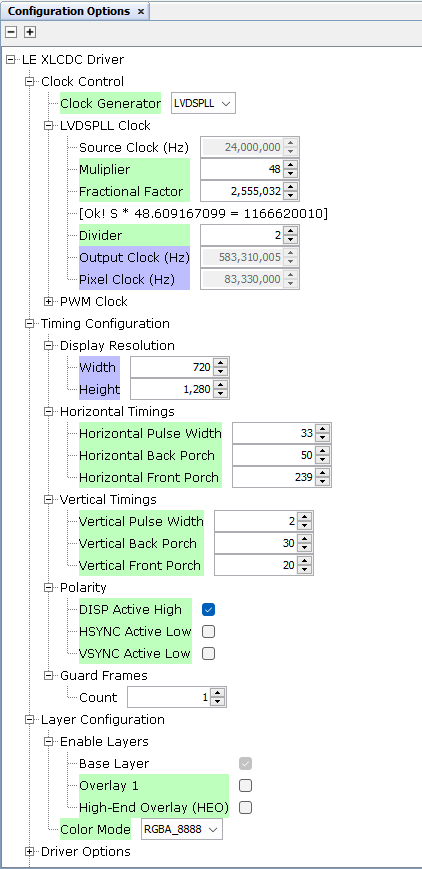
- The value 2,555,032 is not the fractional factor itself but the numerator used in the PLL’s fractional division to achieve the fractional part of 0.60916799. This numerator, combined with an appropriate denominator (specific to the clock generator’s design), fine-tunes the multiplication of the 24 MHz source clock to produce the desired output frequency (583,310,005 Hz), which is then divided by 2 to yield the pixel clock (83,330,000 Hz). The exact denominator depends on the PLL’s internal settings. In this case:
With Divider = 2: