
1.4.1.1 Simulation Settings
(Ask a Question)To pass the .mem file for simulation, perform the
following steps:
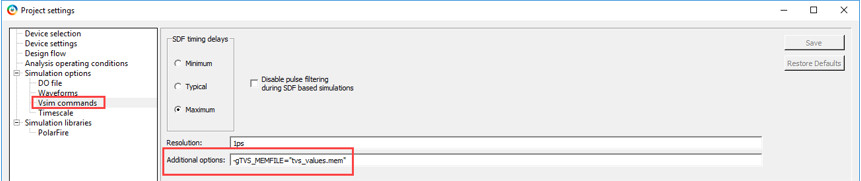
- Navigate to and open Libero® SoC project settings.
- Under Simulation
options, select Vsim commands, enter
-gTVS_MEMFILE=“tvs_values.mem”in the Additional options field, and then click Save.
A sample tvs_values.mem file is provided in the
simulation folder. The .mem file must be available in the simulation
folder of the Libero project. The tvs_values.mem file captures the 16-bit
digital output of the TVS block at different time instances.
To simulate the design, perform the following steps:
- In the Design
Flow tab, right-click Simulate under
Verify Pre-Synthesis Design, and then select Open
Interactively.
Figure 1-5. Design Flow—Simulate 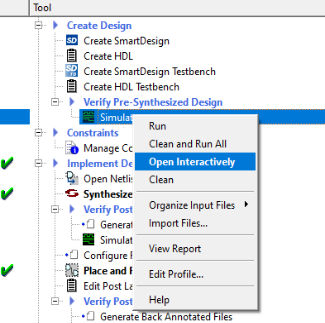
The Wave window appears when the simulation is completed, as shown in the following figure. Since all the four channels are enabled, the TVS circuit outputs a value of the four channels, at a given point in time, on the VALUE output along with the channel number on the CHANNEL output. The data present on the VALUE and CHANNEL outputs are valid only when the VALID output is asserted. Observe the following from the simulation results:
- After the channel is enabled for conversion, the TVS block takes 390 μs to complete the conversion.
- Each channel has a conversion delay of 410 μs.
- The conversion rate is equal to 1920 μs, which is same as the conversion rate set in the TVS configurator.
- TVS block generates the output values based on the values given
in the
tvs_values.memfile.
The following figure shows the UI of ModelSim Pro ME Wave window.Figure 1-6. ModelSim Pro ME Wave Window 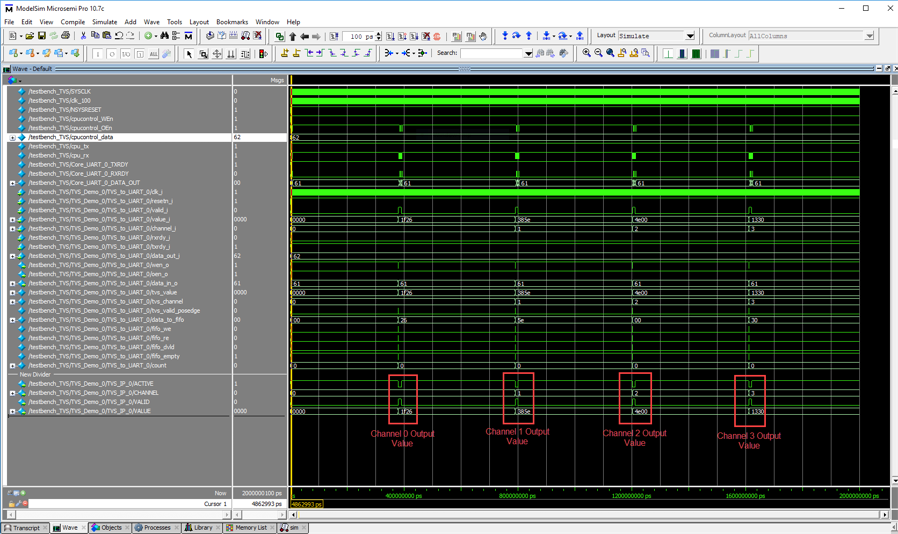
- Close ModelSim Pro ME and the Libero project.