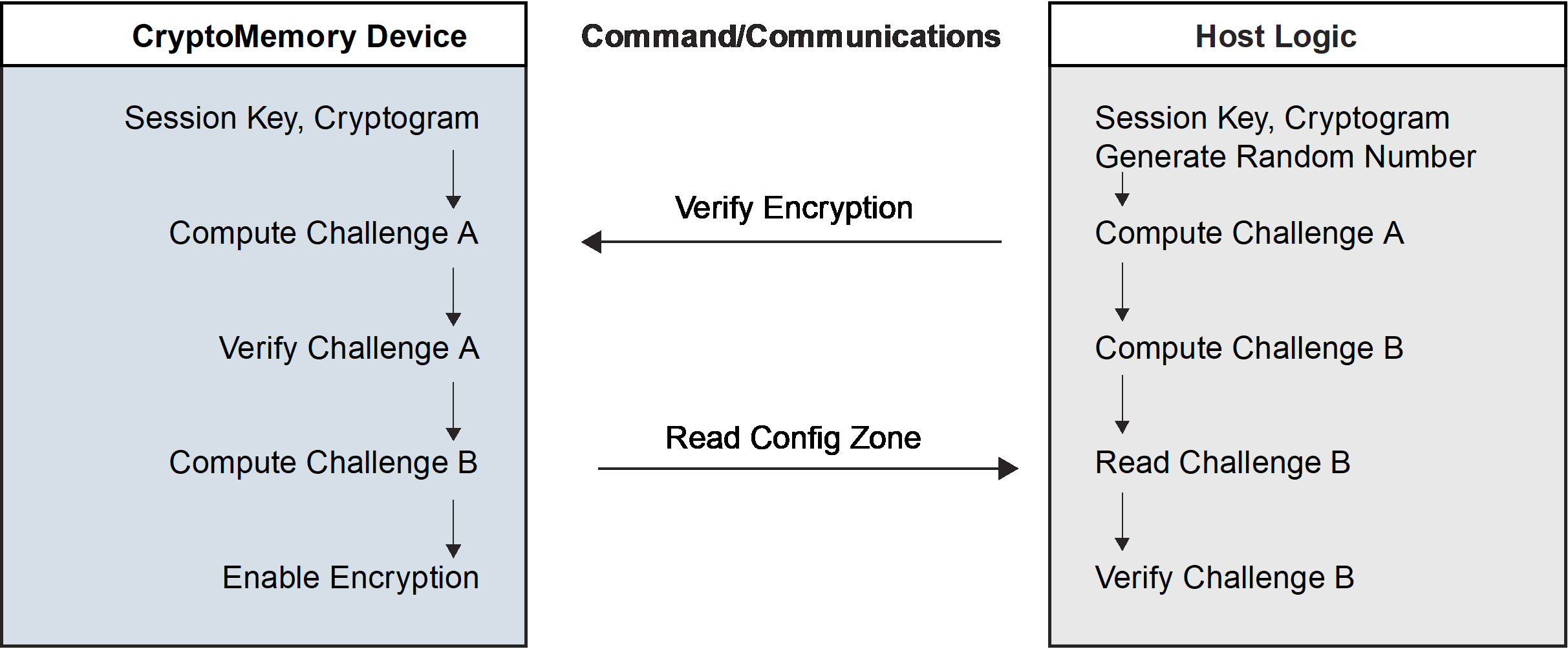
6.1.3 Data Encryption
CryptoMemory® allows the use of encryption between a host system and the CryptoMemory device to protect the confidentiality of data during read-write access and password verification operations. To enable encryption, the host must generate a challenge using the session encryption key generated from the authentication activation step. The host then needs to call the Verify Crypto command again with the device still in active Authentication mode. The session encryption key must belong to the active authentication key set. The host may enable encryption at any time, after which all data exchanged between the host and the device’s user zones will be encrypted. If a user zone configuration in the access register requires encryption, the host must enter Encryption mode and must encrypt all data transmitted to and from the zone for the duration of the active encryption session. CryptoMemory does not encrypt system zone data except for passwords and password attempt counters. Passwords and password attempt counters require encryption during active Authentication or Encryption modes.
Each successful entry into Encryption mode renders the mode active for the current key set until the next call to the Verify Crypto command or a device reset. Only one key set may be active at any time. Unsuccessful calls to the Verify Crypto command exit both Encryption and Authentication modes, and decrement the value of the Authentication Attempts Counter (AAC) register. Decrementing the AAC to $00 permanently disables the corresponding key set and permanently renders the corresponding user zone(s) under protection inaccessible. Activating encryption is similar in process to activating authentication, with the exception that the session encryption key replaces the secret seed. The process uses the verify encryption variant of the Verify Crypto command (see section 8.2 Command Set and section 10.3 Command Set).