
6.4.4 Over-The-Air (OTA) Server Setup
The user must follow these steps to set up the OTA-HTTPS server for the WINCS02 OTA demo:
- On the PC, navigate to the
ota_wincs02_demo\Toolsdirectory. - Download the latest WINCS02 firmware.
- After downloading the firmware
package, unzip it and navigate to the
NC_release_x.x.x\bindirectory. Copy thewincs02_ota.binfile and paste it into thewireless_apps_rnwf\apps\ota_demo\toolsfolder, replacing the existing file. - Open a terminal window in this folder.
- Connect the PC to the same Access Point (AP) as the WINCS02 device.
- Run the following command in the
terminal window to obtain the PC’s IP address:
- Type
ipconfigand press Enter.ipconfig
Note: Copy the IP address of the PC. The user can use this for server configuration.
Figure 6-110. IPv4 Address 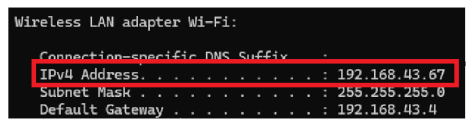
- Type
- Update the mutual authentication
certificate and key file names, as well as the port number, in the Python server
script (
mutual_auth_server.py).- Run the mutual
authentication Python server as the following:
Figure 6-111. Mutual TLS Authentication Enabled 
- Run the mutual
authentication Python server as the following:
Note:
- The IP address and port number are required for Net service configuration on the WINCS02 device.
- By default, the server script is set for mutual authentication, To disable
this feature, set the parameter
MUTUAL_AUTH_ENABLEDtofalsein the configuration.