
6.4.5 Serial Terminal Monitoring
The user must follow these steps to monitor the OTA update process via a serial terminal:
- Open a terminal application (for example, Tera Term or PuTTY) on your PC.
- Connect to the host board by selecting “USB Serial Device” in the terminal
application.
- From the drop-down list, select USB Serial Device.
- Configure the serial connection settings as follows:
- Baud Rate: 115200.
- Data Bits: 8.
- Parity: None.
- Stop Bits: 1.
- Flow Control: None.
- Press the Reset button on the PIC32WM-BW1 Curiosity Board.
- The user must observe the boot process.
- The PIC32WM-BW1 Curiosity Board connects to the Home-AP and print the obtained IP address.
- Wait for the PIC32WM-BW1 Curiosity Board to receive
the Simple Network Time Protocol (SNTP) time.
- Once received, the PIC32WM-BW1 Curiosity Board attempts to connect to the HTTPS server using the configured credentials.
- The user must monitor the OTA update process.
- After a successful connection, the PIC32WM-BW1 Curiosity Board requests the firmware image from the server.
- The server sends the image, displaying the progress and successful transmission of the file in 10% increments.
Note: If the PIC32WM-BW1 Curiosity Board does not receive the SNTP time, update the SNTP server/IP address and retry.Figure 6-112. PIC32WM-BW1 OTA Demo Status 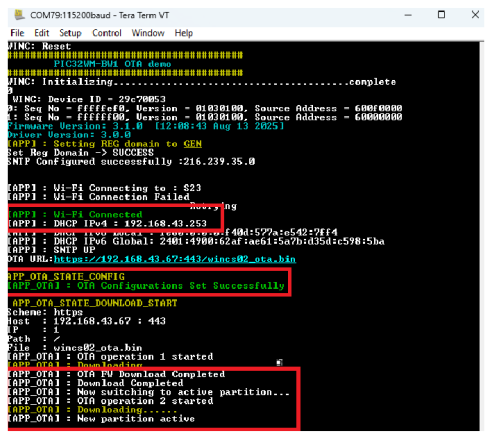
Figure 6-113. HTTPS Server Logs 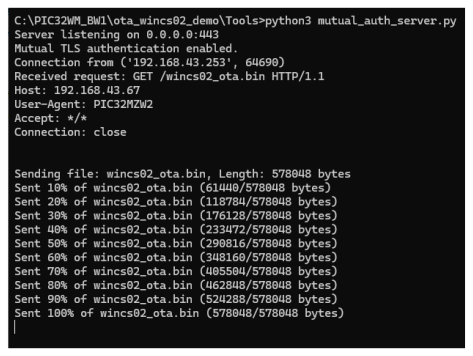
- Press the Reset button on the host board. The device will reboot and start up with the updated firmware