2.12 Application Coding
The user has the MPLAB Harmony components configured for a G3 application. The Getting Started demo implements a typical G3 Device application. This application is written using the API's provided by the MPLAB Harmony G3 and TCP/IP components.
The G3 demo for PIC32CXMTG device is already available in smartenergy_g3_apps repository. The application source files
are available at smartenergy_g3_apps\apps\g3_apps\g3_device_udp\src.
Let's use of those source files for the MyFirstG3app demo.
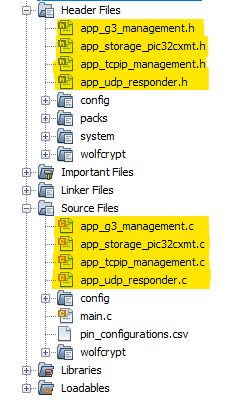
- Copy the application files (
app_g3_management.c, app_g3_management.h,
                    app_storage_pic32cxmt.c, app_storage_pic32cxmt.h, app_tcpip_management.c,
                    app_tcpip_management.h, app_udp_responder.c, app_udp_responder.h
) fromsmartenergy_g3_apps\apps\g3_apps\g3_device_udp\src path. - Paste the application files to demo at
...\projectPath\src. - Add Header and Source files to the MPLAB project.
Figure 2-68. Application Files