
3.2.1.8 Partition/Panel Selection
Some dsPIC33A devices support dual panel operation. On these devices, there are two physical Flash panels that can be configured as one logical memory, or in a mode call dual panel where one panel is active and one that is inactive.
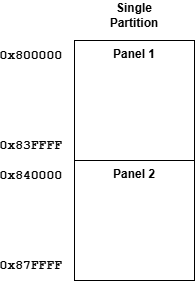
In Figure 3-2, both panels are aligned to create a single, larger memory space.
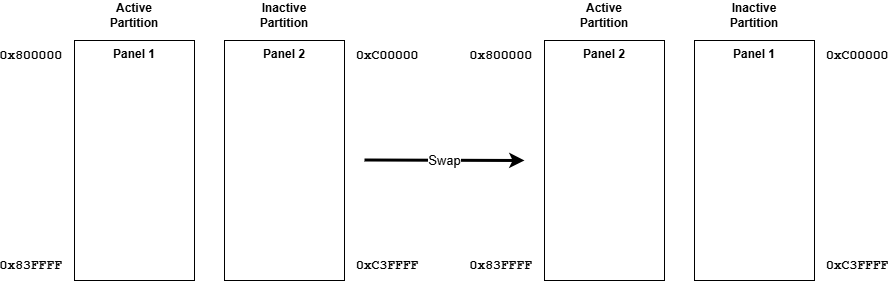
One panel is the active panel on Reset, and the other panel is inactive. The active panel can be switched while running or can be determined on Reset through the partition sequence number. Each Flash partition region defines if it impacts Panel 1, Panel 2 or both.
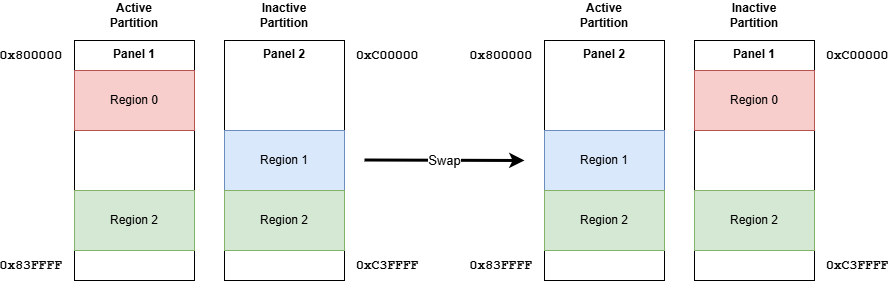
Region 0 is defined for Panel 1, Region 1 is defined for Panel 2 and Region 2 is defined for both partitions. The associated permissions and rules defined by the regions apply to the specified panels regardless if they are the active or inactive partition.