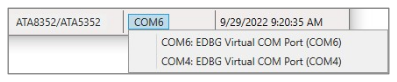
Each SAM C21 Xplained Pro Board is connected via USB to the PC and is identified via its
associated COM identifier, for example, COM6. Select the desired COM identifier from the
drop-down list to switch between connected Xplained Pro Boards (see the following
figure)Figure 4-14. COM Port Selector
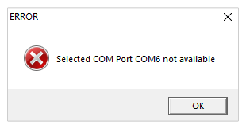
If the currently selected board is no longer connected to the PC, the GUI tool displays
the following error message.Figure 4-15. Error Pop-up Window
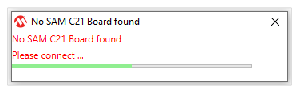
Note: The GUI tool displays the following error message at start-up
when no board is connected. In this case, the GUI does not start until at least one SAM
C21 Board is connected to the PC. Figure 4-16. No SAM C21 Board Found
The online versions of the documents are provided as a courtesy. Verify all content and data in the device’s PDF documentation found on the device product page.