
5.1 Top Toolbar
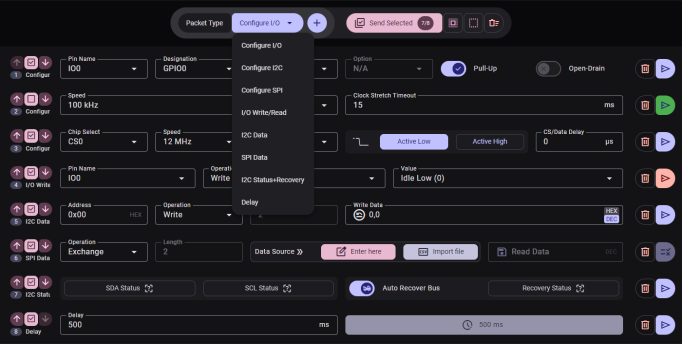
| Control | Description |
|---|---|
| Packet Type drop-down | Select the type of packet to add: I2C Data I2C Status + Recovery SPI Data I/O Write/Read Delay Configure I/O Configure I2C Configure SPI |
| Add button | Creates a new packet of the selected type. Disabled until a type is selected. |
| Send Selected button | Sends all enabled packets in sequence. Displays a badge showing the count of selected packets out of the total (e.g., 3/5). Disabled if no device is selected or a send is in progress. Shows a progress bar when active. |
| Select All button | Enables all packets in the list |
| Select None button | Disables all packets in the list |
| Remove All button | Opens a confirmation dialog to remove all packets |