
2.7 Details Panel
The Details button in the footer toggles a scrollable panel that accumulates status messages from device operations.
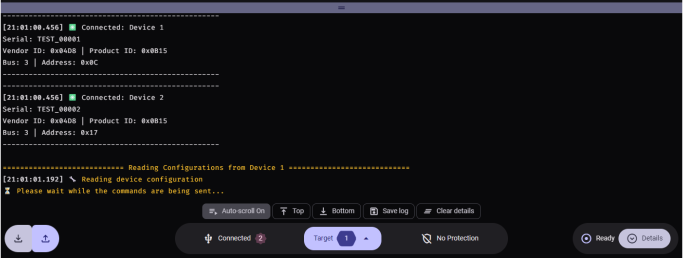
- Messages are displayed in a monospaced font for easy reading of hex values and data. Messages are color-coded by type: red for errors, yellow for warnings, and green for success.
- The panel can be resized by dragging the handle at the top. The height is adjustable within a minimum and maximum range.
- Click the Clear details chip button to clear all accumulated messages
- The Auto-scroll toggle (enabled by default) automatically scrolls to the bottom when new content arrives. Click the toggle to disable auto-scrolling.
- The Top and Bottom buttons allow quick navigation to the beginning or end of the log content
- The Save log button exports the details panel content to a
.logor.txtfile via a system save dialog - The panel is useful for diagnosing communication issues or verifying commands sent and the responses received