
2.5 Configure Design Initialization Data and Memories
(Ask a Question)The Configure Design Initialization Data and Memories step generates an TCM initialization client and adds it to sNVM, μPROM, or an external SPI flash, based on the type of non-volatile memory selected. In this tutorial, the TCM is initialized from µPROM.
This process requires the user application executable file (hex file) as input to initialize the TCM after device power-up. The hex file is provided with the design files.
To select the non-volatile memory and generate the initialization client, perform the following steps:
- On the Design Flow tab, double-click Configure Design Initialization Data and Memories. The Design and Memory Initialization window opens.
- Under Third stage (uPROM/sNVM/SPI-Flash), select µPROM, as shown in the following figure. In the Third Stage pane, select uPROM as the non-volatile memory, and retain the default start address (0x00000000).Important: The default start address 0x00000000 is retained because there are no other initialization clients specified in µPROM.
Figure 2-4. Design and Memory Initialization Window 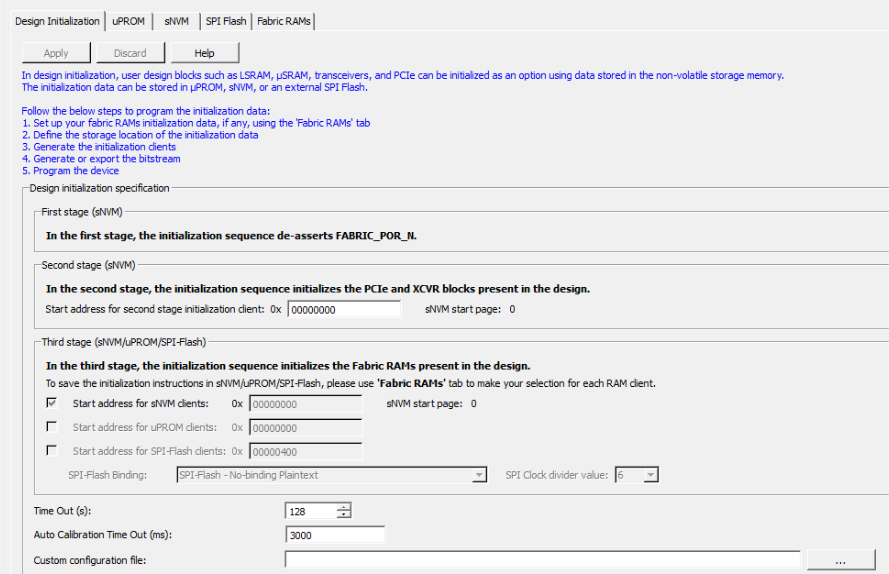
- On the Fabric RAMs tab,
select
MiV_SS_0/MIV_RV32_C0_0/MIV_RV32_C0_0/u_ipcore_0/gen_tcm0.u_subsys_TCM_0/tcm_ram_macro.u_ram_0from the list of logical instances, and click Edit, as shown in the following figure. TheMiV_SS_0/MIV_RV32_C0_0/MIV_RV32_C0_0/u_ipcore_0/gen_tcm0.u_subsys_TCM_0/tcm_ram_macro.u_ram_0instance is the Mi-V processor's main memory. The System Controller initializes this instance with the imported client at power-up.Figure 2-5. Fabric RAMs Tab 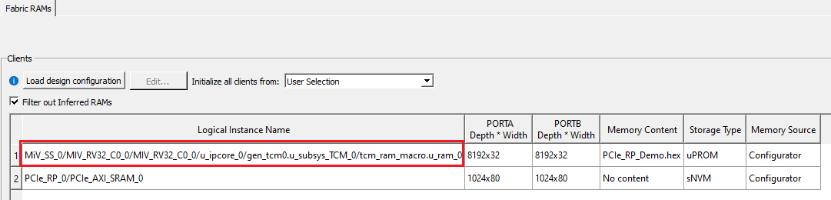
- In the Edit Fabric RAM Initialization
Client dialog box, click the Import button
next to Content from file, as shown in the following
figure.
Figure 2-6. Edit Fabric RAM Initialization Client Dialog Box 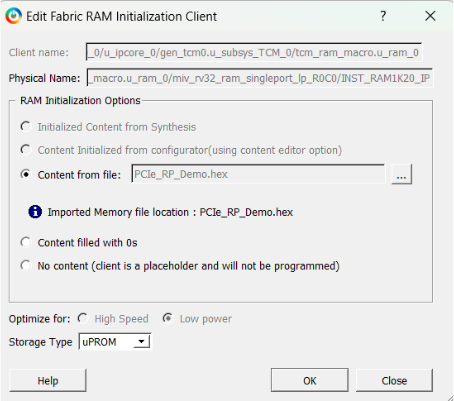
In the following dialog box, browse the mpf_an4664_df/HW/src/softconsole/PCIe_RP_Demo.hex file and double-click it.
Important: If any changes are applied to the Mi-V application code, rebuild the SoftConsole project in the release mode. - In the Edit Fabric RAM Initialization Client window, click OK.
- On the Fabric RAMs tab,
click Apply, as shown in the following figure.
Figure 2-7. Applying Fabric RAM Content 
- The initialization client for
MiV_SS_0/MIV_RV32_C0_0/MIV_RV32_C0_0/u_ipcore_0/gen_tcm0.u_subsys_TCM_0/tcm_ram_macro.u_ram_0instance is generated and stored in µPROM. This step must be verified by viewing the third stage client created in the µPROM tab, as shown in the following figure.Figure 2-8. Third Stage INIT Client 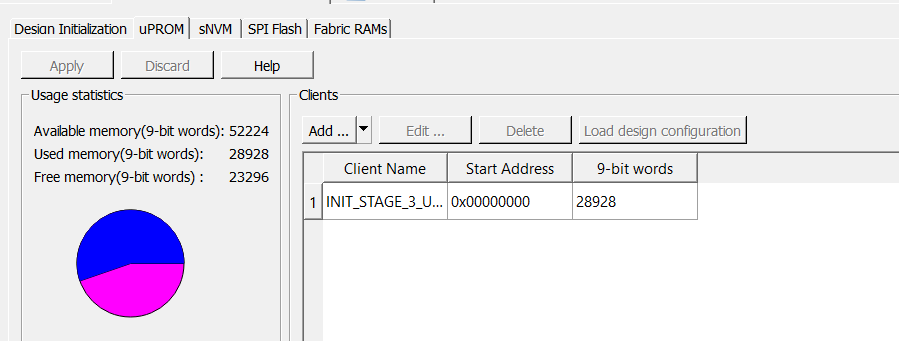
By default, the first and second stage clients are generated and stored in sNVM.