4.5.1 Adding a Dummy Client to Unlock the sNVM Pages
(Ask a Question)In this design, the AES key provided by the user is stored in the sNVM on page#4 using a system service call. Hence, a dummy client to clear the sNVM page needs to be added to the sNVM configurator. To add a dummy client, perform the following steps:
- In the Libero Design Flow window, double click Configure Design Initialization Data and Memories.
- In the Design and Memory Initialization page, select the sNVM tab.
- In the sNVM Clients pane, click
Add... > Add PlainText NonAuthenticated
Client., see the following figure.
Figure 4-19. Adding Dummy Client 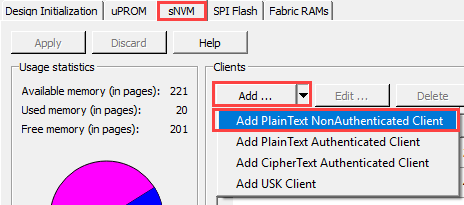
- In the Add PlainText
NonAuthenticated client window, select Content filled with
0s radio button and enter:
- Client name: Clear_sNVM
- Start page (decimal): 4
- Number of bytes (decimal): 256
- Click OK to create a dummy client.
Figure 4-20. Dummy Client Parameters 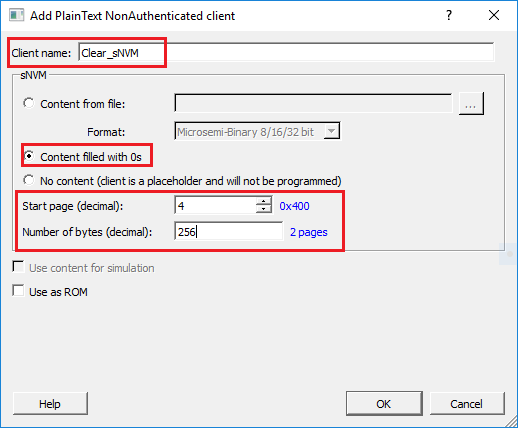
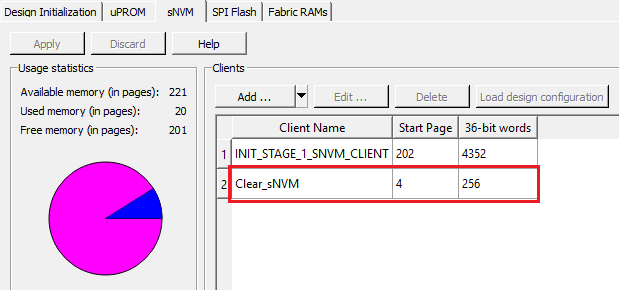
The following figure shows the dummy client added to the sNVM Clients pane.
Figure 4-21. Dummy Client