
9.1 Running the Design in Static IP Mode
(Ask a Question)The following steps describe how to run the design in static IP mode.
Note: This procedure provide steps to run the webserver design. To run
IAP using the TFTP design, perform the same steps by opening the IAP_TFTP project in
SoftConsole.
- In SoftConsole Project Explorer window, right click the webserver (gbe_webserver) project, and select Properties, as shown in Figure 9-2.
- In Properties for
gbe_webserver window, remove the NET_USE_DCHP
symbol listed under Defined symbols (-D), and click
Apply and Close, as shown in the following figure.
Figure 9-4. Properties for gbe_webserver 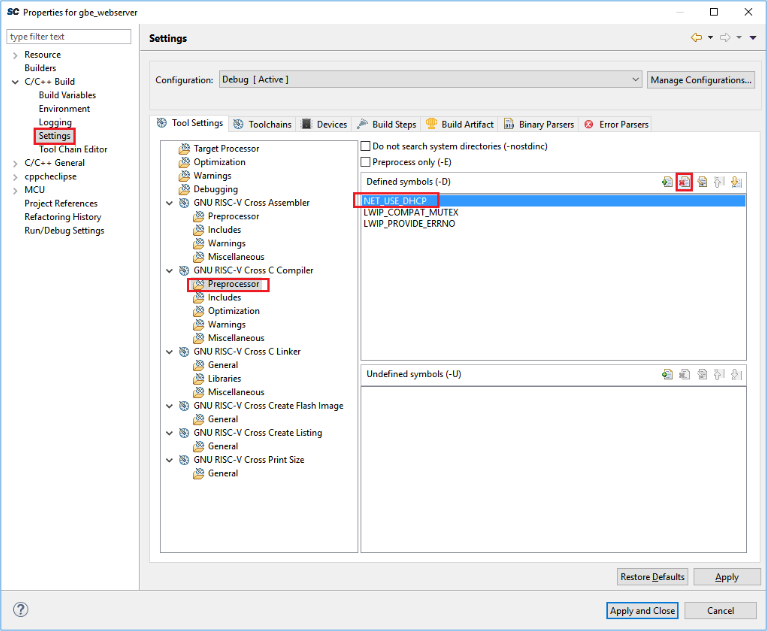
- Change the host TCP/IP settings to
connect with the board that has static IP address,
169.254.1.23. The following figure shows the host PC
TCP/IP settings.
Figure 9-5. Host PC TCP/IP Settings 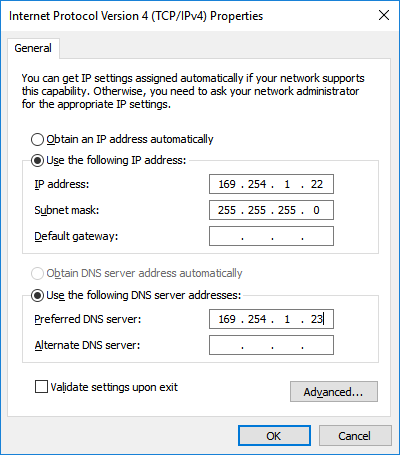
- Connect the PolarFire Evaluation board port J15 to Host PC using the RJ45 Ethernet cable.
- After configuring the settings,
compile the design, load it into the memory, and run it using SoftConsole. The
Serial terminal shows board static IP:
/*CoreTSE
                        WebServer using Mi-V SoftProcessor*/
Acquiring IP address.169.254.1.23 - Use the IP address in the web browser to display the Microchip web page.