
4.3.3 Auto Update
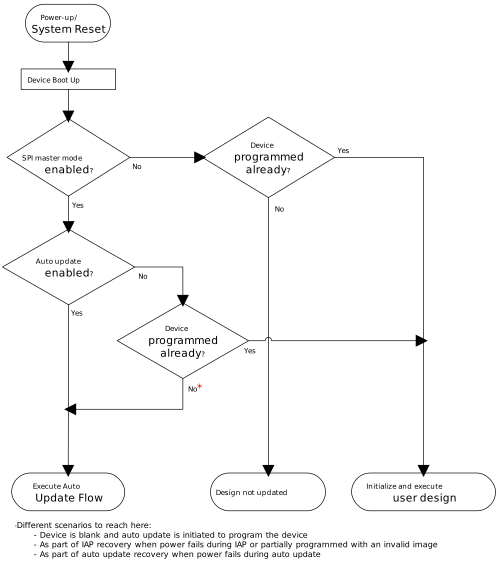
(Ask a Question)For auto update to occur, the auto update feature needs to be enabled in the user design. On power-up, the device selects the newer version of the first two images stored in the SPI directory. If the version of the newer image does not match that of the currently programmed image, then auto update occurs. The following figure shows the high-level flow of auto update programming.
The following figure shows the detailed flow of auto update programming.
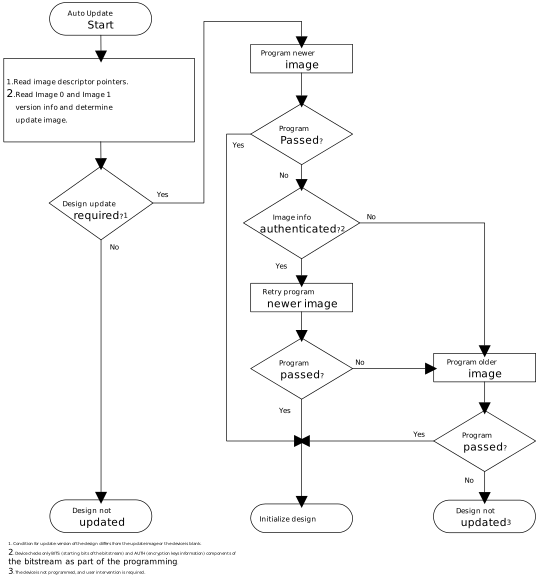
The following table lists example auto update conditions when different image versions are available in the SPI flash.
| Version Running on the Device | First Two Image Versions Available in SPI Flash | Back Level Protection | Image Version Selected for Auto Update |
|---|---|---|---|
| Blank device | 2, 3 | Disabled | 3 |
| 3 | 2, 3 | Disabled | No auto update |
| 3 | 1, 2 | Disabled | 2 |
| 2 | 1, 2 | Disabled | No auto update |
| 1 | 1, 2 | Disabled | 2 |
| 2 | 3, 4 | Enabled and set to 4 | No auto update |
| 3 | 3, 5 | Enabled and set to 4 | 5 |
| 2 | 3, 5 | Enabled and set to 4 | 5 |
| 5 | 2, 3 | Enabled and set to 4 | No auto update |