
19.4.2.7 Transfer Triggers and Actions
A DMA transfer through a DMA channel can be started only when a DMA transfer request is detected and the DMA channel has been granted access to the DMA. A transfer request can be triggered by software, a peripheral or an event.
A peripheral trigger source for each DMA channel can be selected using the Trigger Source bit field in the Channel Control B (CHCTRLB.TRIGSRC) register.
A DMA software trigger can be generated by setting the Channel n Software Trigger bit in the Software Trigger Control (SWTRIGCTRL.SWTRIGn) register. Software triggers can be generated regardless of the CHCTRLB.TRIGSRC configuration.
Refer to the Event Input Actions section for details on configuring DMA transfers triggered by events.
The trigger actions are available in the Trigger Action bit field in the Channel Control B (CHCTRLB.TRIGACT) register. By default, a trigger generates a request for a block transfer operation. If a single descriptor is defined for a channel, the channel is automatically disabled when a block transfer is completed. If a list of linked descriptors is defined for a channel, the channel is automatically disabled when the last descriptor in the list is executed. If the list still contains descriptors to execute, the channel will wait for the next block transfer trigger. When enabled again, the channel will continue to wait for the next block transfer trigger. The trigger actions can also be configured to generate a request for a beat transfer (CHCTRLB.TRIGACT = 0x2) or transaction transfer (CHCTRLB.TRIGACT = 0x3), instead of a block transfer (CHCTRLB.TRIGACT = 0x0).
The following figure shows an example of triggers used with two linked block descriptors.
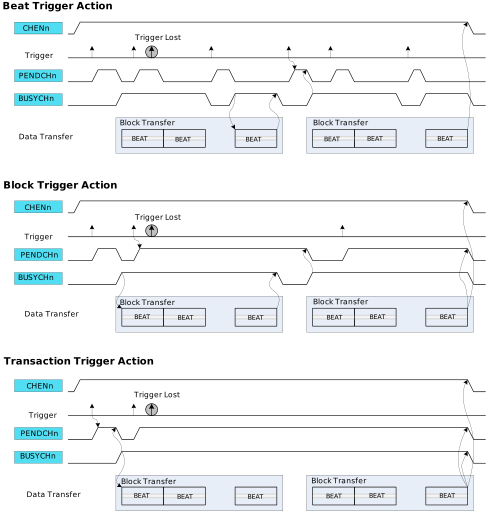
If the trigger source generates a transfer request for a channel during an ongoing transfer, the new transfer request will be kept pending (CHSTATUS.PEND = 1), and the new transfer can start after the ongoing one is complete. Only one pending transfer can be kept per channel. If the trigger source generates additional transfer requests while one is already pending, those additional requests will be lost. All channels pending status flags are also available in the Pending Channels (PENDCH) register.
When the transfer starts, the corresponding Channel Busy status flag is set in Channel Status (CHSTATUS.BUSY) register. When the trigger action is complete, the Channel Busy status flag is cleared. All channel busy status flags are also available in the Busy Channels (BUSYCH) register in theDMAC.