
9.8.1 Adding an Actel Device
To add an Actel device:
- Click the Add Actel Device
button from the Chain Programming grid. The Add Actel
Device dialog box appears.
Figure 9-113. Add Actel Device 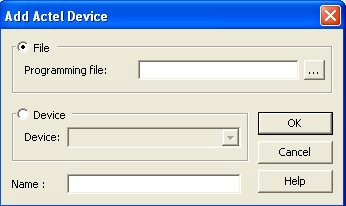
- Click Device radio button and choose your device from the Device list drop-down menu.
- Click the File radio button, then click the Browse button in the Programming file text box to find your PDB/STAPL file. The Use File dialog box appears.
- Find your PDB/STAPL file and click Open. Your PDB/STAPL file name appears in the Name text box. You can change the name by clicking in the text box
- Click OK. Your device displays in the Chain Programming grid. You can also add an Actel device from .