
13.14.1 SmartDesign User Interface Overview
The SmartDesign tool is integrated into the Libero IDE Project Manager.
The Canvas is the main work area for SmartDesign. The Canvas view displays a high-level block diagram of your design.
The Grid and Schematic views are available from the SmartDesign menu in the Project Manager. These views are not required to complete your design.
The Grid displays your design in a configurable spreadsheet, enabling you to specify detailed connections for each instance in your SmartDesign.
The Schematic View displays your design elements with port names, busses, and nets.
Changes made in one view will immediately be reflected in all other views, enabling you to quickly make and see changes to your design.
You can close each view by right-clicking the name of the view inside the SmartDesign tab and choosing Close.
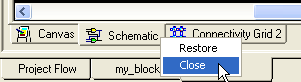
To re-open any view, from SmartDesign menu choose Show Canvas View, Show Grid View, or Show Schematic View.