
13.19.3.2 Adding/Renaming Ports
To add ports:
- From the SmartDesign menu, choose Logic
> Add port. The Add Port dialog box appears (as shown below).
Figure 13-53. Add New Port Dialog Box 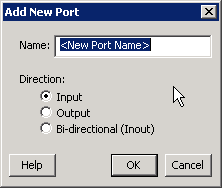
- Specify the name of the port you wish to add. You can specify a bus port by indicating the bus width directly into the name using brackets [ ], such as mybus[3:0].
- Select the direction of the port.
To remove a port from the top level, select the port in the Grid, right-click and choose Delete Top Level Port.
To rename a top-level port, right-click the top-level non-pad port and choose Modify Top Level Port. You can rename the port, change the bus width (if the port is a bus), and change the port direction.
To rename an external pad:
- Right-click a pad in the top-level port and
select Rename External Pad. The Rename External Pad dialog box appears, as shown in
the figure below.
Figure 13-54. Rename External Pad Dialog Box 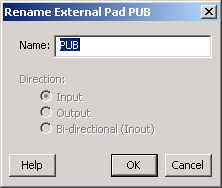
- Enter the new name for the external pad and click OK.