8.3.1 Actel EDIF Command
To automatically generate an Actel compatible EDIF netlist, add a custom command to the Tools menu in ViewDraw. Once added, this command appears as the Actel EDIF command. The following steps describe the procedure.
- Invoke ViewDraw. If you have not already set up a project, the Project Manager Wizard dialog box is displayed. You must set up an Actel project for ViewDraw to open. Go to Project Setup for the procedure.
- Open the Customize Tools Menu dialog box. Choose the Customize command from the Tools menu.
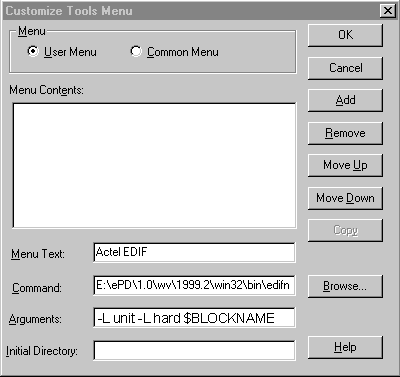
- Add the Actel EDIF command. Click the User Menu radio button. In the Menu Text
box, type “Actel EDIF.” In the Command box, type or use the Browse button to select:
c:\ePD\2.0\wv\1999.2\win32\bin\edifneto.exe. In the Arguments box, type-L unit -L hard $BLOCKNAME. Click OK. The following figure shows the configured Customize Tools Menu dialog box.Figure 8-1. Customize Tools Menu Dialog Box