
13.10.3 Generate a Designer Block Component in Designer
When you finish Compile and Layout, click Generate Block to create your Designer Block files.
When you publish your Designer Block, Designer
creates a netlist file (*.v; *.vhd), info file for Libero IDE
(*.cxf), Designer Block file (*.cdb), and report
files.
Libero IDE uses the CXF file to manage and audit the Designer Block in your project. The CDB file contains all your design information for the Designer Block.
You can edit your Designer Block later; just open the design, make your changes, and re-create.
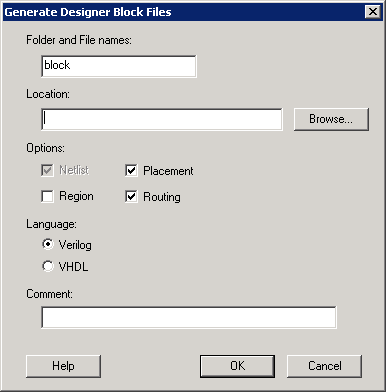
Designer Block name - Specifies the name of all your exported files. The exported Designer Block files in this example are named block_test.cxf, block_test.cdb, and block_test_syn.v and block_test_sim.v (block_test_syn.vhd and block_test_sim.vhd for VHDL).
Location - Specifies the location of your exported Designer Block files. Click the Browse button to navigate if you do not know the full pathname.