3.2.1 ChipView window
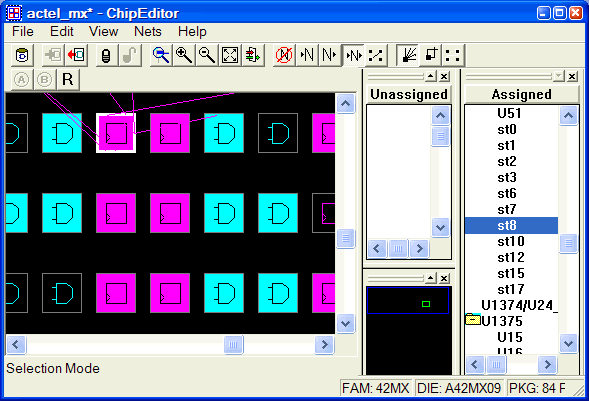
The ChipEditor ChipView window displays logic modules and assigned macros. When you select a macro in the ChipView window, the macro location is highlighted in the World View window and the macro name is selected in the Assigned list box.
To see a magnified or reduced view of your design, use the Zoom commands in the View menu or toolbar. To use hot keys, place your mouse over the desired zoom area and use SHIFT and the “+” plus key to zoom in on the location and SHIFT and the “-” minus key to zoom out.
Colors and symbols
Colors and symbols differentiate the I/O and logic macros in ChipEditor. The following table defines the default colors assigned to symbols. You can change these colors per design.
| Color/Symbol | Definition |
|---|---|
| White Border | A white border denotes a selected object. |
| Black Background | A black background denotes an unused or unassigned module. |
| Blue | Blue denotes a combinatorial module. |
| Yellow | Yellow denotes locked logic modules. If the module is selected, the symbol appears yellow. If the module is unselected, the border appears yellow. |
| Green | Green denotes I/O modules. |
| Red | Red denotes clock modules. |
| Magenta | Magenta denotes sequential modules. |
 | Reserved modules that are not user definable are gray, crossed-out symbols on a black background. |
 | Clock modules are red. Unused/unassigned modules are red symbols on a black background. Used/assigned modules are black symbols on a red background. |
 | Input/Output modules are green. Unused/unassigned modules are green symbols on a black background. Used/assigned modules are black symbols on a green background. |
 | Combinatorial modules are blue. Unused/unassigned modules are blue symbols on a black background. Used/assigned modules are black symbols on a blue background. |
 | Sequential modules are magenta. Unused/unassigned modules are magenta symbols on a black background. Used/assigned modules are black symbols on a magenta background. |
 | Buffer modules are blue. |

| RAM modules are green. Unused/unassigned modules are green symbols (RAM) on a black background. Used/assigned modules are black on a green background. |
|
| PLL modules are green. Unused/unassigned modules are green symbols (PLL) on a black background. Used/assigned modules are black on a green background. |
 | I/O Inbuff modules are pink on a black background. Used/assigned modules are black on a pink background. |