
5.10.1 Creating a Designer Block Component in Libero IDE
You must create two Libero IDE projects in order to instantiate your Designer Block in Libero IDE: one to create and publish your Designer Block, and another in which to instantiate your Designer Block. This section describes how to create your Designer Block.
See Instantiating a Designer Block in Libero IDE for more information.
The general design flow for creating a Designer Block in Libero IDE is shown in the figure below.
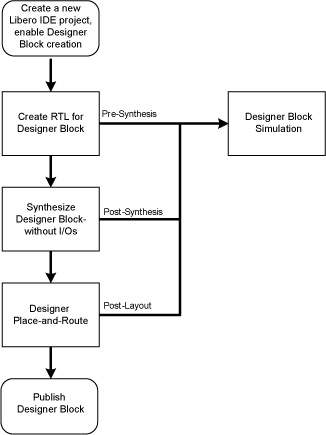
To create a Designer Block in Libero IDE with a new design:
- Start a new project. You must select a family that supports Block designs (IGLOO, ProASIC3, SmartFusion, Fusion, Axcelerator, and RTAX-S). After your project opens, from the Project menu, choose , and click the Enable Designer Block creation checkbox.
- Create a design in Libero IDE (standard design flow - create RTL, synthesize, run place-and-route and generate the block using Designer).
To create a Designer Block in the Libero IDE with an existing design, open your design and from the Projectmenu, choose , and click the Enable Designer Block creation checkbox. Note that your design must use a device family that supports Designer Blocks (IGLOO, ProASIC3, SmartFusion, Fusion, Axcelerator, and RTAX-S).