
9.1.2.2 Operation/Production Planning
The figure illustrates the operation flow used during production planning. In this flow, the production coordinator generates programming files (STAPL and PDB), with or without serialization and security settings, depending on production requirements. The production coordinator then loads the programming files into the FlashPro software to configure production‑programming settings, such as serialization options, action selections, and procedure selections.
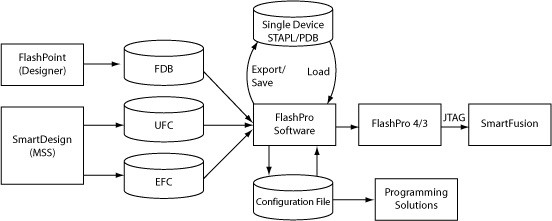
The production coordinator may want to generate different configuration files for each programming station (depending on the logistics and serialization options). For example, if the Programming file contains 10,000 serial data and the production coordinator decides to split the serial data designation to one thousand for each programming station, then ten configuration files will be generated (one for each of the ten programming stations). However, if you are not using serialization, you only need one configuration file.
The production coordinator can test the configuration files with one or more FlashPro4/3/3X programmers before sending it to the production programming floor. If PDB files are used in the production flow, warning icons may
appear on the FlashPro/FlashPoint GUI because the automatic audit cannot find the source file on the production environment; the PDB file contains the valid programming data. If STAPL files are used, loaded STAPL files will be audited on execution of an action to determine if the original STAPL file has been modified. If it has not been modified, the action will continue to run. If it has been modified you will be prompted to reload the modified STAPL file, or to continue running the current action. If you select to reload the modified STAPL file, all previous programming settings will be refreshed and will need to be performed again.