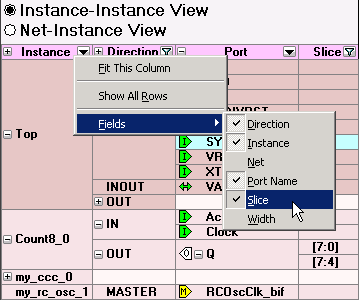
To add a field in the Display panel, right-click the field title (such as Direction in the image below) and from the right-click menu choose Field, and select the field you wish to add or remove. Added fields appear at the end of the list of fields.
You can add fields to view additional information about a port. Also, adding the field enables you to Sort your design based on fields.
Figure 13-42. Add Field Menu in Display Panel
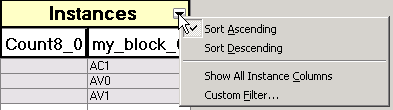
To add an instance in the Connection panel, click the drop-down arrow in Instances (as shown in
the figure below), and choose Custom Filter. The Custom Filter dialog box appears. Select checkbox for
the instance you wish to view, or use the Find box to search for a specific instance or
range of instances.Figure 13-43. Add an Instance with Custom Filter in Connection Panel