
2.2.4.2.1 Parameter Settings
(Ask a Question)The parameter settings include the optimization of μSRAM for High Speed or Low Power, clock signal settings, and optional port settings.
The following figure shows the μSRAM configurator.
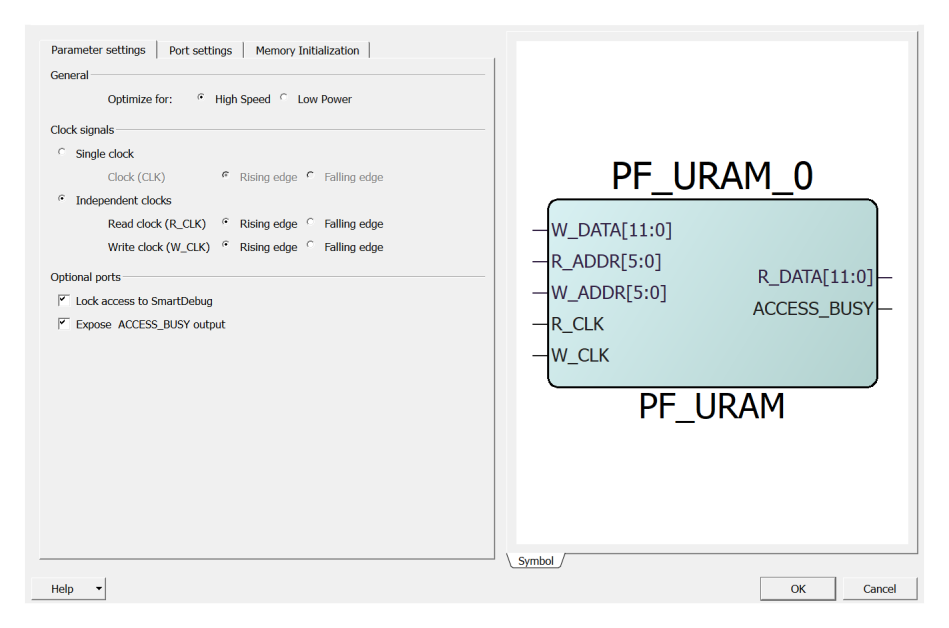
Optimization for High Speed or Low Power
The user can optimize the μSRAM macro with one of the following
options:
- High Speed—to optimizes the μSRAM macro for speed and area by using width cascading.
- Low Power—to optimizes the μSRAM macro for low power, but it also uses additional logic at the input and output by using depth cascading.
Single Clock (CLK) or Independent Clocks (R_CLK and W_CLK)
The user can set the clock signals and the signal polarity as follows:
- Single clock—drives both write and read ports with the same clock. This is the default configuration for μSRAM.
- Independent clocks—selects the independent clock for each port (R_CLK for read port and W_CLK for write port).
- Rising edge or Falling edge—changes the signal polarity.
Optional Ports
The user can select one of the following optional ports:
- Lock access to SmartDebug—when enabled, SmartDebug access to the RAM is disabled.
- Expose ACCESS_BUSY output—when enabled, SmartDebug ACCESS_BUSY signal is available as top-level port.