
2.2.4.2.2 Port Settings
(Ask a Question)In the Port settings tab, you can set RAM size, select ports, and set data output on write settings for both write and read ports. The following figure shows the μSRAM IP block port settings.
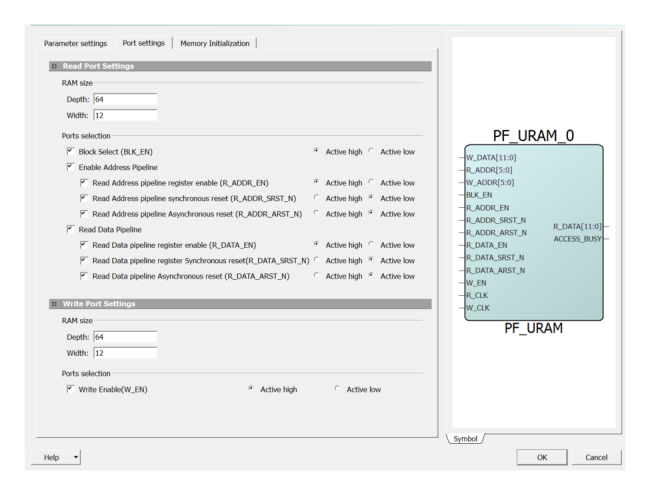
RAM Size
- Depth—sets the depth range. The depth range for each port is 1 to 2048. The maximum value depends on the die.
- Width—sets the width range. The width range for each port is 1 to 53280.
Port Selection: Block Select for Read Port (BLK_EN)
The default configuration for BLK_EN is unchecked, which ties the signal to the Active state and removes it from the generated macro. For more information, see Read Operation. Select Active high or Active low to change the signal polarity.
Write Enable (W_EN)
The default configuration for W_EN is unchecked (disabled), which ties the signal to the Active state and removes it from the generated macro. For more information, see Write Operation. Select Active high or Active low to change the signal polarity.
Enable Address Pipeline
- Register Enable (R_ADDR_EN and R_DATA_EN): the pipeline registers for read ports have Active high enable inputs. By default, the check box is disabled. Selecting this check box adds the signal to the top-level port.
- Synchronous Reset (R_ADDR_SRST_N and R_DATA_SRST_N): the pipeline registers for read ports have Active low, synchronous reset inputs. By default, the check box is disabled. Selecting this check box adds the signal to the top-level port.
- Asynchronous Reset (R_ADDR_ARST_N and R_DATA_ARST_N): the pipeline registers for read ports have Active low, asynchronous reset inputs. By default, the check box is disabled. Selecting this check box adds the signal to the top-level port.
- Active high or Active low: changes the signal polarity.
Read Data Pipeline—This option is disabled by default. Select the Pipeline check box to enable pipelining of Read data (R_DATA). This is a static selection and cannot be changed dynamically by driving it with a signal. Turning off pipelining of Read data also disables the configuration options of the respective R_DATA_EN, R_DATA_SRST_N, and R_DATA_ARST_N signals.