
6.3.6.2 OTA Application Development
This section provides a comprehensive guide for compiling and integrating the MCC
auto-generated BLE OTA project, including mandatory user edits, event handler integration,
timer configuration, and
.bin file generation for OTA updates.- Open and compile the project generated by
MCC.
- Click Build the Porject
(hammer symbol).
Figure 6-59. Build the Project 
Figure 6-60. Build Fail Message 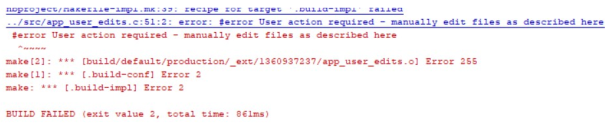
- If the user encounters a mandatory error in
app_user_edits.c, follow the instructions in the note within the file. Make the required changes, then comment out the#errordirective to proceed.Figure 6-61. #Error: User Action Required 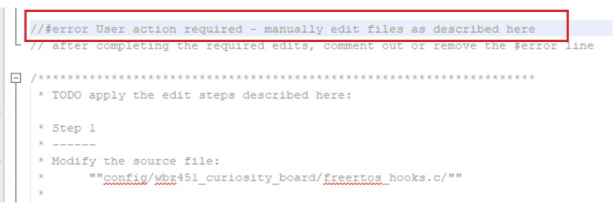
- Click Build the Porject
(hammer symbol).
- In
app.c, within theAPP_Tasks()function, callAPP_Init()when the state isAPP_STATE_INIT.#include "ble_dis/ble_dis.h" #include "app_ble_conn_handler.h" #include "app_ble_sensor.h" #include "app_adv.h" #include "system/console/sys_console.h" #include "ble_otaps/ble_otaps.h" #include "app_ota/app_ota_handler.h" uint32_t wbz451_silicon_revision = 0x00; static void APP_Init(void) { APP_BleStackInit(); /* Add BLE Service */ BLE_DIS_Add(); APP_UpdateLocalName(0, NULL); APP_InitConnList(); APP_ADV_Init(); SYS_CONSOLE_MESSAGE("BLE Sensor Application: Version "); SYS_CONSOLE_PRINT(BLE_SENSOR_VERSION); SYS_CONSOLE_MESSAGE("\n\r[BLE} Advertisement Started\n\r"); APP_TRPS_Sensor_Init(); APP_OTA_HDL_Init(); wbz451_silicon_revision = DSU_REGS->DSU_DID; SYS_CONSOLE_PRINT("\n\r[Device DID] 0x%x \n\r", (DSU_REGS->DSU_DID)); if(wbz451_silicon_revision & (1 << 29)) // A2 Silicon // if((wbz451_silicon_revision >> 28) == (0x02)) { /* PPS Output Remapping */ PPS_REGS->PPS_RPB0G1R = 11U; PPS_REGS->PPS_RPB3G4R = 12U; PPS_REGS->PPS_RPB5G3R = 11U; } else if((wbz451_silicon_revision >> 28) == (0x00)) // A0 silicon { /* PPS Output Remapping */ PPS_REGS->PPS_RPB0G1R = 21U; PPS_REGS->PPS_RPB3G4R = 21U; PPS_REGS->PPS_RPB5G3R = 22U; } }
Figure 6-62. APP Tasks Function Logic 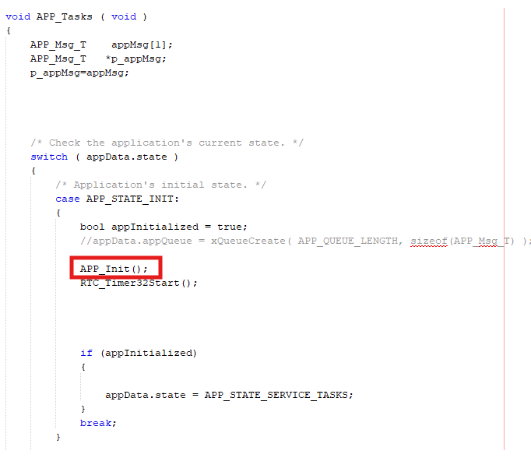
- In
app_ble/app_otaps_handler.c, call the BLE OTA event handler function to manage OTA events.- The user can call the function to process OTA events during run-time by invoking the
appropriate
handler.
APP_OTA_EvtHandler(p_event);
- The user can use this
#includedirective to make the OTA handler functions and definitions available in the source file.#include "../app_ota/app_ota_handler.h"
Figure 6-63. Application OTA Handler (Header File) 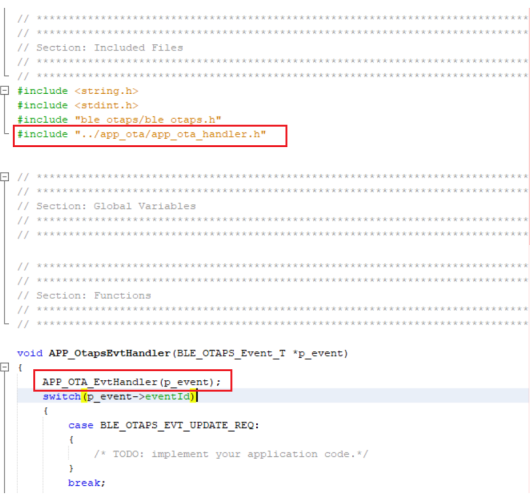
- The user can call the function to process OTA events during run-time by invoking the
appropriate
handler.
- In
app_timer/app_timer.c, uncomment the timer message IDs needed for OTA error handling and reboot timer. When the timer fires, post the related message to the FreeRTOS application task queue.Figure 6-64. app_timer/app_timer.c: Timer Expiry Handler Posting OTA and Reboot Messages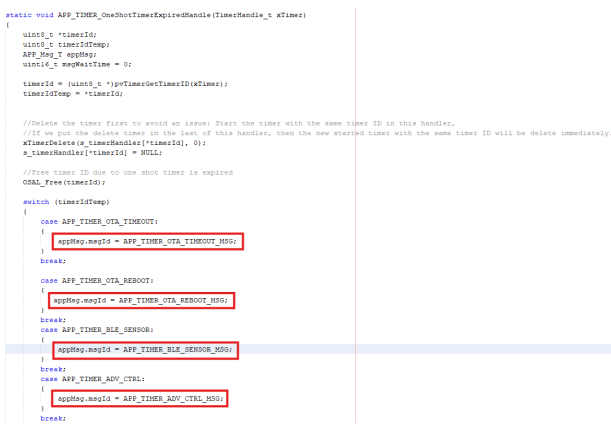
Figure 6-65. Periodic Timer Expired Handle 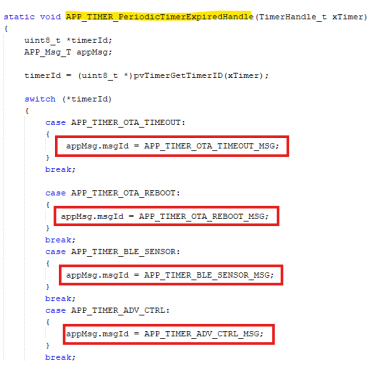
- In the
APP_MsgId_Tstructure inapp.h, define the following message IDs:APP_TIMER_ADV_CTRL_MSG, APP_TIMER_BLE_SENSOR_MSG, APP_MSG_TRS_BLE_SENSOR_INT, APP_TIMER_OTA_TIMEOUT_MSG, APP_TIMER_OTA_REBOOT_MSG,
Figure 6-66. Application Message Identifier Type ( APP_MsgID_T)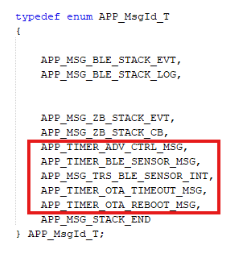
- In
app.c, within theAPP_Tasks()function, handle the timer messages by calling the appropriate handler functions:else if(p_appMsg->msgId== APP_TIMER_ADV_CTRL_MSG) { APP_BLE_Adv_TimerHandler(); } else if(p_appMsg->msgId== APP_TIMER_BLE_SENSOR_MSG) { APP_TRPS_Sensor_TimerHandler(); } else if(p_appMsg->msgId== APP_MSG_TRS_BLE_SENSOR_INT) { APP_TRPS_Sensor_Button_Handler(); } else if(p_appMsg->msgId == APP_TIMER_OTA_TIMEOUT_MSG) { APP_OTA_Timeout_Handler(); } else if(p_appMsg->msgId== APP_TIMER_OTA_REBOOT_MSG) { APP_OTA_Reboot_Handler(); }Figure 6-67. Application Timer Advertisement Control Message 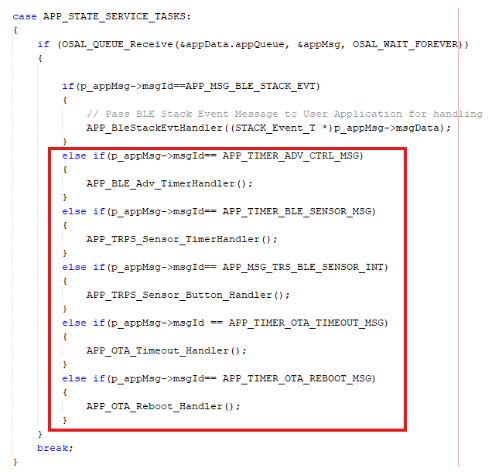
- In
app_ble/app_ble_handler.c, call the BLE GAP connected/disconnected event handler. Inapp_ble_conn_handler.c, handle these events and restart advertising when disconnected.- The user can call the function to process BLE GAP connection events during run-time
by invoking the appropriate
handler.
APP_BleGapConnEvtHandler(p_event);
- The user can use the
#includedirective to make the BLE connection handler functions and definitions available in the source file.#include "../app_ble_conn_handler.h"
Figure 6-68. System Console Operations and BLE Connection Handler 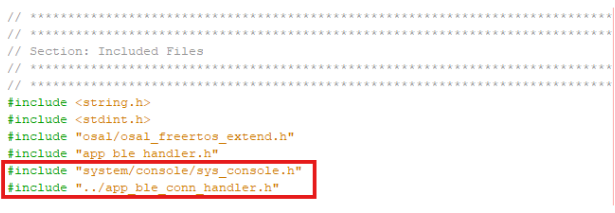
Figure 6-69. BLE_GAP Connection Event Handler 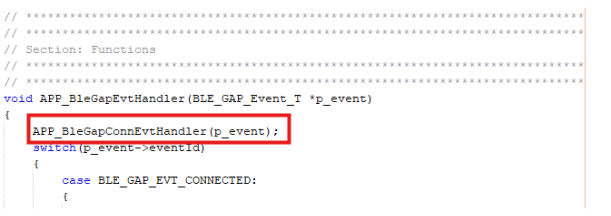
Figure 6-70. BLE Security Manager Protocol Event Handler 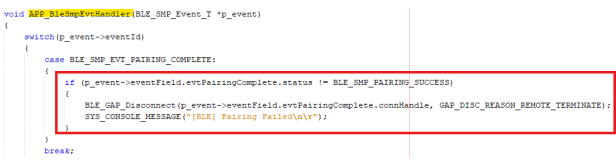
- The user can call the function to process BLE GAP connection events during run-time
by invoking the appropriate
handler.
- In
APP_BleGapConnEvtHandler()inapp_ble_conn_handler.c, add print statements to the console for debugging and status updates.Figure 6-71. BLE Connection Establishment and Device Info Update 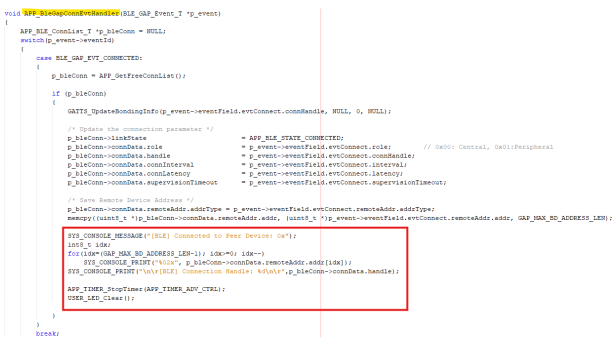
- If low power (Standby Sleep) mode is enabled, prevent the device from entering sleep
during OTA upgrades. In
app_idle_task(), add a check before callingBT_SYS_EnterSleepMode(), using the OTA handler include:#include "app_ota/app_ota_handler.h" if (APP_OTA_HDL_GetOTAMode() != APP_OTA_MODE_OTA) { BT_SYS_EnterSleepMode(RTC_Timer32FrequencyGet(), RTC_Timer32CounterGet()); }
Figure 6-72. Application OTA Handler Get OTA Mode 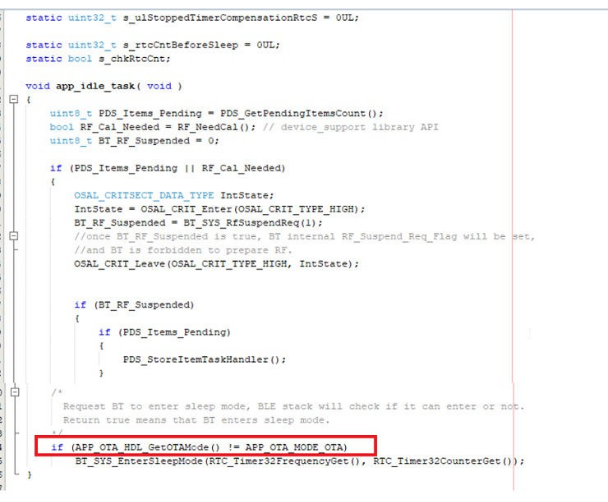
- In
app_idle_task.c, modifyvPortSuppressTicksAndSleep().- Add the required code to manage sleep behavior during OTA in the FreeRTOS tickless idle function.
Figure 6-73. Tickless Idle Mode Implementation 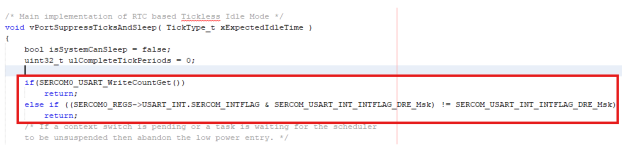
- In
app_ota-handler.c, comment out thes_fwImageValidatevalue as per the application needs.Figure 6-74. OTA Firmware Image Type and CRC Validation Logic 
- In
app_trsps_handler.c, implement code for handlingBLE_TRSPS_EVT_CTRL_STATUSandBLE_TRSPS_EVT_VENDOR_CMDevents.Figure 6-75. TRSPS Control Status and Vendor Command Event Handling 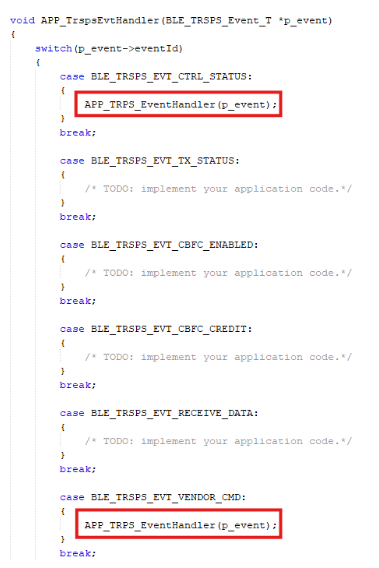
- In
app_ble_conn_handler.c, handle theBLE_GAP_EVT_DISCONNECTEDevent and include the following files:#include "app_timer/app_timer.h" #include "app_adv.h" #include "app_trps.h" #include "app_ble_sensor.h" #include "peripheral/gpio/plib_gpio.h" #include "system/console/sys_console.h"
Figure 6-76. BLE_GAP Event Disconnected 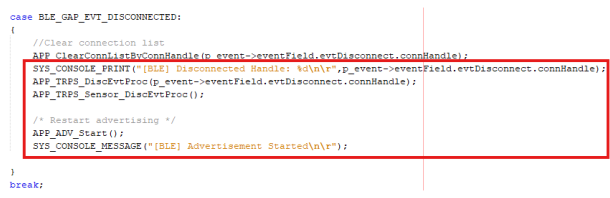
- Build the project and ensure there are no errors.
Figure 6-77. Build the Project
For more details on the OTA Profile Middleware API’s, refer to the MPLAB Harmony Wireless BLE in the Reference Documentation from Related Links.
For more details on OTA Application Level API’s, see BLE_OTA from Related Links.