6.3.6.4 Unified Image Generation
The following steps outline the unified image generation process:
- Compile the project and ensure
there are no errors.
Figure 6-82. Compile and Build Project 
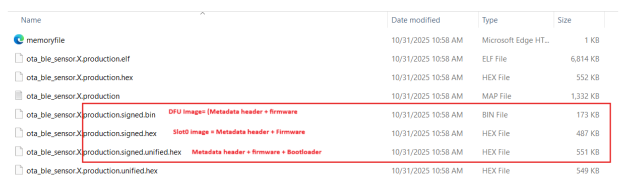
- After a successful build, MPLAB® X generates the hex images in the
dist\default\production project production folder. The
SignFirmware MPLAB X script creates three new images; each image is valid with
the metadata header appended. The following table provides the details:
Table 6-5. Generated Firmware Image Types Image Name Description signed.unified.hexSigned unified image including the bootloader. This is the image to be programmed onto the device. signed.hexSigned image without the bootloader. This image does not work unless the bootloader is already present on the device. signed.binUpgradable image for serial DFU. Use this image if upgrading the device via serial interface. For more details, see Device Firmware Upgrade Over Serial from Related Links.