
3.4.1 Bus Functional Model
(Ask a Question)The PCIe is simulated using the bus functional model (BFM) for the PCIESS. In this simulation mode, data transfer does not go off-chip. In the PCIe BFM simulation mode, the user can transmit/receive data from/to the fabric using the AXI4 of the PCIESS. The BFM simulation mode is selected from the Libero PCIESS configurator GUI. Libero generates the required files for BFM simulation.
The PCIe simulation mode uses the BFM commands to emulate the data that is transferred through the PCIESS block across the AXI4 bus interface to the fabric. The physical layer of the PCIe protocol is not implemented in this simulation mode. This mode is intended to validate the fabric interfaces to the PCIESS block, and the physical interface of the XCVR PMA block remains inactive.
The AXI4 bus master in the PCIe BFM simulation mode enables emulating 64-bit AXI master transactions. Libero SoC generates user-customizable BFM files that instruct the model to start transactions to the fabric. The BFM allows the user to use a text file to issue the transactions from the PCIe AXI master interface to the fabric, to exercise the design. The user must include BFM instructions in the <project>/simulation/PCIE_<0:1>_user.bfm file. The BFM model interprets these instructions and initiates AXI transactions in sequence. The PCIE_init.bfm model is not user-editable.
The AXI bus slave available in the BFM_PCIe simulation mode provides a 64-bit slave interface for fabric communication. The user can interact with the slave by initiating write and read bus transactions using the appropriate bus master. The slave acts as a memory model, so whatever is written to the slave can be read back from the same address.
The BFM commands used in the PCIESS BFM files are similar to the BFM commands used by the bus masters.
The following figure shows the PCIESS BFM structure.
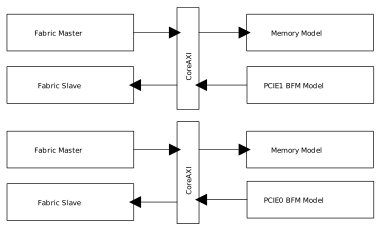
The command, write64 w <base_address> <base_address_offset> <32-bit MSB> <32-bit LSB>, makes the bus master start a 64-bit write transaction on the external bus for a slave with address given by the <base_address> and <base_address_offset>, using the data generated by <32-bit MSB> and <32-bit LSB >.
For example: write64 w 0x00000000 0x0 0xA0A1A2A3 0xB0B1B2B3;
The command, readcheck64 w <base_address> <base_address_offset> <32-bit MSB> <32-bit LSB>, makes the bus master start a 64-bit read transaction for the address given by the <base_address> and <base_address_offset>. It compares the 64-bit read data to the data.
The command setup 0x8 <source address> <destination address> is used to set source and destination address for DMA.
The command setup 0xA <data> is used to set DMA data source.
<data> =0 ==> Data increment by 1 starting from 0x1
<data> =1 ==> Random data
<data> =2 ==> Data from DMADATA.vec file
For example, setup 0xA 0x2 data_in.vec. In this command, DMA data source is data_in.vec file.
The command setup 0x9 <DMA_Length> <Control> is used for DMA control.
set control bit0 to '1' => start DMA
set control bit1 to '1' => sets transfer from PCIe domain to Fabric domain
set control bit2 to '1' => sets transfer from Fabric domain to PCIe domain
When control = 0x3, BFM starts DMA transfer from PCIe to Fabric and when control = 0x5, BFM starts DMA transfers from Fabric to PCIe.