
4.3.1.1 UART—Memory Test
(Ask a Question)The following instructions describe running Memory Test between PC and DDR3L/DDR4/LSRAM:
- Select Transfer Size (4 KB to 1 MB) from the drop-down list.
- Select Pattern Selection from the drop-down list—Increment, Decrement, Fill with Zeros, Fill with Ones, Fill with all A’s and Fill with all 5’s. For successful Memory test operation, the Pattern Type for Mem Init and Pattern Type for Mem Test should be same.
- Click Memory Test.
- GUI sends command to fabric logic to initiate the LSRAM/DDR3L/DDR4 memory
- GUI sends command to fabric logic to read and compare LSRAM/DDR3L/DDR4 memory
The following figure shows the UART—Memory Test tab.
Figure 4-19. UART—Memory Test 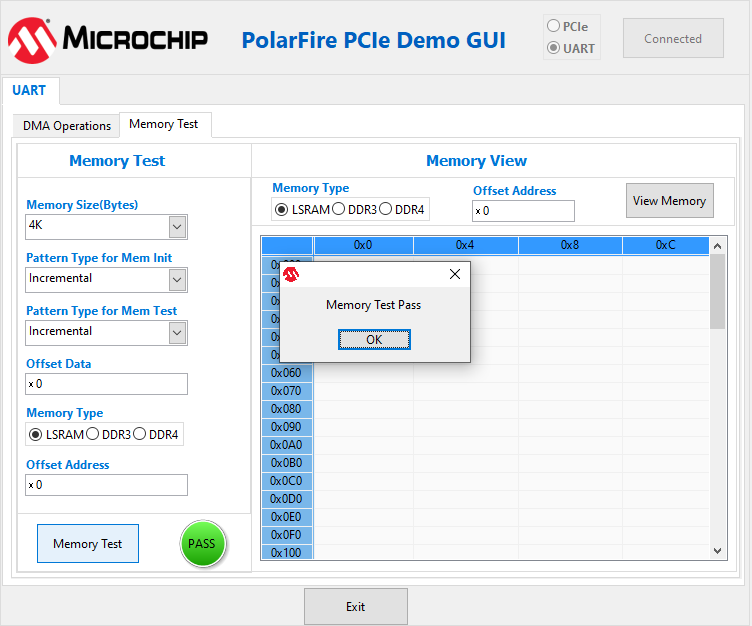 Important: Change the Offset Address and click View Memory to read the RAM memory content. Ensure that the Pattern Type for Mem Init and Pattern Type for Mem Test should be same as shown in the preceding image.
 - Click View Memory. It shows 1 KB of RAM memory content.
- Click OK.
- Click Exit.