
4.3.1 UART—DMA Operations
(Ask a Question)The following instructions describe the different ways to read data through LSRAM and DDR:
- Select one of the following options from the Continuous DMA Transfer Type Selection drop-down list:
- DDR3L -> LSRAM: To transfer the data from DDR3L to PolarFire LSRAM memory.
- LSRAM -> DDR3L: To transfer the data from PolarFire LSRAM memory to DDR3L.
- Both DDR3L <->LSRAM: To transfer the data from DDR3L to and from PolarFire LSRAM memory.
- LSRAM -> DDR4: To transfer the data from LSRAM to PolarFire DDR4 memory
- DDR4-> LSRAM: To transfer the data from PolarFire DDR4 memory to LSRAM
- Both LSRAM <->DDR4: To transfer the data from LSRAM to and from PolarFire DDR4 memory
- DDR4 -> DDR3L: To transfer the data from DDR4 to DDR3L memory
- DDR3L -> DDR4: To transfer the data from DDR3L to DDR4 memory
- Both DDR4 <-> DDR3L: To transfer the data from DDR4 to and from DDR3L memory
- Both DDR3L<->DDR4: To transfer the data from DDR3L to and from DDR4 memory.
- Select Transfer Size (4 KB to 512 KB) from the drop-down lists.
- Enter the Loop Count in the box.
- Click Start Transfer. After a successful DMA operation, the GUI displays the throughput and average throughput in MBps. The following figure shows DMA throughput and average throughput from the DDR memory to the LSRAM.
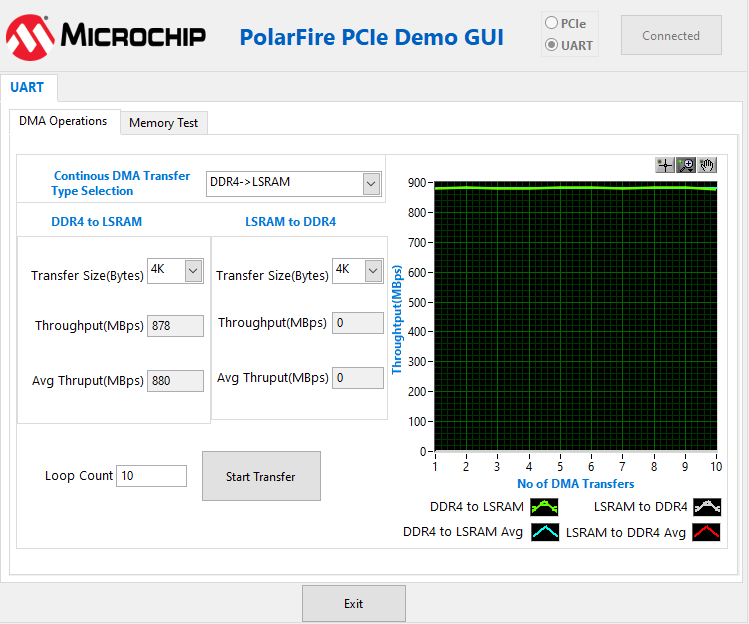
Important: The AXI LSRAM in the design is configured for 4 KB. This 4 KB is over written if more than 4 KB of DMA operation is performed on LSRAM. This option is provided to exercise the throughputs with larger DMA size.