
9.8.3.3 BSDL File
Boundary Scan Description Language (BSDL) files describe the characteristics of a specific device. When using a BSDL file, FlashPro extracts the IR length and TCK frequency for the specific device and uses the information to build the FlashPro STAPL file. If you do not have a BSDL file for your specific device, you must manually enter the IR length and Max TCK for your device. This information should be found in the datasheet for the device.
To add a non Actel device using a BSDL file:
- Click the Add Non-Actel
Device button in the Chain Programming window. The
Add Non-Actel Device dialog box appears.
Figure 9-114. Add Non-Actel Device Dialog Box 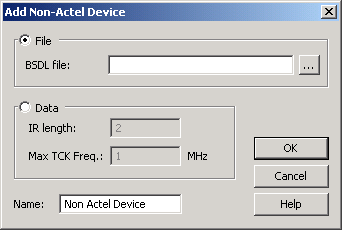
- Type in the BSDL file or locate it by clicking the Browse button. If you click the Browse button to find your BSDL file, the Use File dialog box displays.
- Select your BSDL file from the Use File dialog box, and click Open.
- Click OK, and your device appears in the Chain Programming grid.
When closing the Add Non-Actel Device window, if you specified a BSDL file, it is parsed and its IR length and Max TCK frequency are retrieved.
To add a Non-Actel device using an IR length and a Max TCK frequency:
- Click the Add Non-Actel Device button from the Chain Programming window.
- Click the Data option from the Add Non-Actel Device dialog box.
- Enter the IR length AND the Max TCK frequency in MHz.
- Click OK.
If you decide to use custom data, you must specify both an IR length and Max TCK frequency.