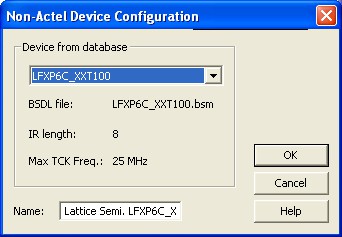
9.8.3.4 Non-Actel Device Configuration Dialog Box
It is possible to add multiple BSDL files to your Non-Actel device database that have the same IDCODE. If the BSDL files list the same IR length but different TCK values, FlashPro® automatically chooses the file with the lowest TCK value by default and no action is required. If the IR lengths are different you receive an error message asking you to resolve the conflict.
To resolve the issue, click the drop-down arrow adjacent to the device name. This opens the Non-Actel Device Configuration dialog box.. From here you can choose the device that you wish to use. Select the device from the dropdown menu and enter a new name or use the default.