
13.13.7 Modify Memory Map Dialog Box
The Modify Memory Map dialog box (shown in the figure below) enables you to connect peripherals to buses via a drop-down menu. To open the dialog box, right-click on the Canvas or specific bus instance and choose Modify Memory Map.
This dialog simplifies connecting peripherals to specific base addresses on the bus. The dialog shows all the busses in the design; select a bus in the left pane to assign or view the peripherals on a bus. Busses that are bridged to other busses are shown beneath the bus in the hierarchy.
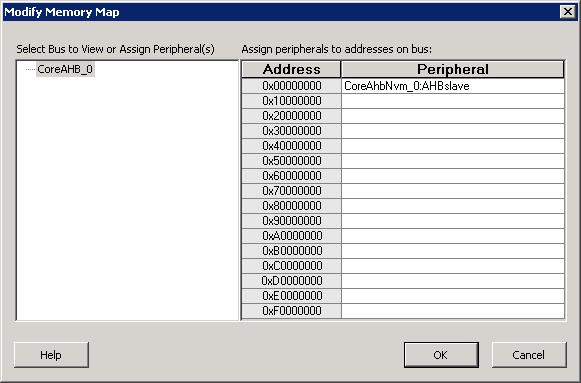
Click the Peripheral drop-down menu to select the peripheral you wish to assign to each address. To remove (unassign) a peripheral from an address, click the drop-down and select the empty element.
Click OK to create the connections between the busses and peripherals in the design.