
9.9.1 Selecting an Action
The actions you have available are based upon what type of STAPL file you have loaded into the software.
To configure a programmer:
- From the Configure menu,
choose Select Action and Procedures. The Select Action and
Procedures dialog box appears.
Figure 9-116. Select Action of Procedures Dialog Box 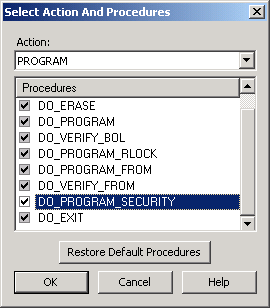
- Click the checkboxes of the available procedures or click the Restore Default Procedures button in the Select Action and Procedures dialog box.
- Click OK.
Click the Restore Default Procedures to return to default settings.