
ELEMENT_TYPE_SURFACE
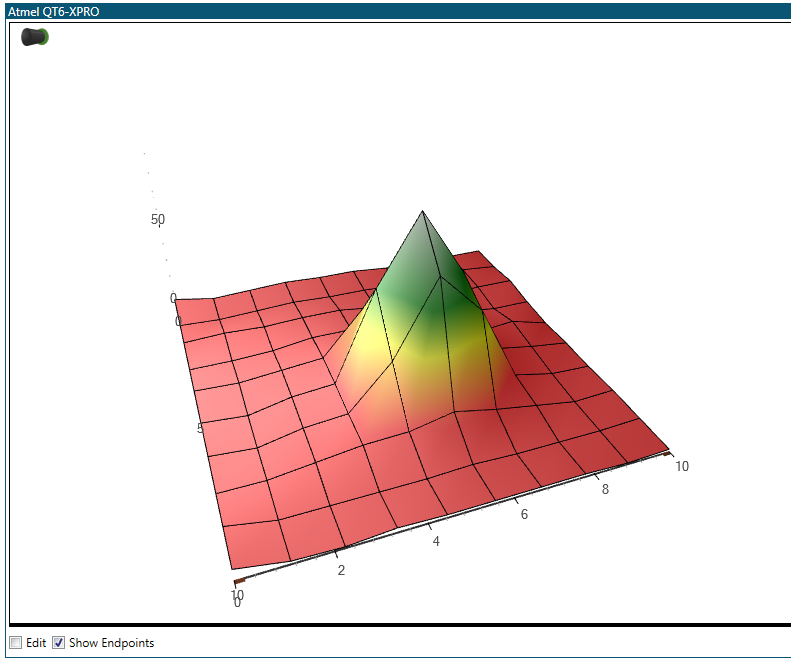
The tables below describe the ELEMENT_TYPE_SURFACE specific parameters and additional fields for the MSG_CONF_DASHBOARD_ELEMENT message. This element generates a 3D surface plot that visualizes the grid of data points from the target. There is one input stream that accepts grid type data.
| Parameter | Value |
|---|---|
| ELEMENT_TYPE | 0x0D |
| Total data length of MSG_CONF_DASHBOARD_ELEMENT when using ELEMENT_TYPE_SURFACE | 47 |
| Field | Size | Values | Description |
|---|---|---|---|
| Fill color | 3 bytes | 0xRRGGBB | RGB color of surface fill |
| Mesh color | 3 bytes | 0xRRGGBB | RGB color of surface mesh |
| Background color | 4 bytes | 0xAARRGGBB | RGB color of background |
| Background gradient color | 4 bytes | 0xAARRGGBB | RGB color of background gradient |
| Axis color | 3 bytes | 0xRRGGBB | RGB color of axes |
| Tick color | 3 bytes | 0xRRGGBB | RGB color of ticks |
| X Rotation | 1 byte | -90-90 | Rotation of view around X axis in degrees |
| Y Rotation | 1 byte | -90-90 | Rotation of view around Y axis in degrees |
| Z Rotation | 1 byte | -90-90 | Rotation of view around Z axis in degrees |
| Attributes | 1 byte |
| |
| Scaling mode | 1 byte |
| |
| Axis minimum | 4 bytes | Floating point | Minimum value (floor) of Y axis |
| Axis maximum | 4 bytes | Floating point | Maximum value (roof) of Y axis |
Example
The picture below shows an example of a surface element. The element data fields for the example are shown in the table below the picture.
: The appearance of elements will vary with operating system version
and configuration.
| Field | Value |
|---|---|
| Z-index | 0 |
| X-coordinate | 5 |
| Y-coordinate | 5 |
| Width | 750 |
| Height | 590 |
| Element type | 0x0D |
| Fill color | 0x2F4F4F |
| Mesh color | 0x000000 |
| Background color | 0x00000000 |
| Axis color | 0x505050 |
| Tick color | 0x505050 |
| X Rotation | 35 |
| Y Rotation | -70 |
| Z Rotation | 0 |
| Attributes | 0b00111111 |
| Scaling mode | 5 |
| Axis minimum | 0 |
| Axis maximum | 10 |