
2.7.6 Generate Design Initialization Data
(Ask a Question)- Double-click Generate Design
Initialization Data on the Design Flow tab.When the design initialization data is generated successfully, a green tick mark appears next to Generate Design Initialization Data in the Libero Design flow, and the following messages appear in the Log window:
Info: 'Generate design initialization data' has completed successfully.Info: Stage 1 initialization client has been added to sNVM.Info: Stage 2_3 initialization client has been added to sNVMInfo: Stage 3 initialization client has been added to SPI. - Click the SPI Flash tab to verify that the bin file has been
added, as shown in the following figure.Important: In order to streamline the SPI-Flash Programming support with FlashPro6, effective from Libero SoC v12.4, the vendor information is replaced with the density of the target memory.
Figure 2-39. SPI Flash Tab 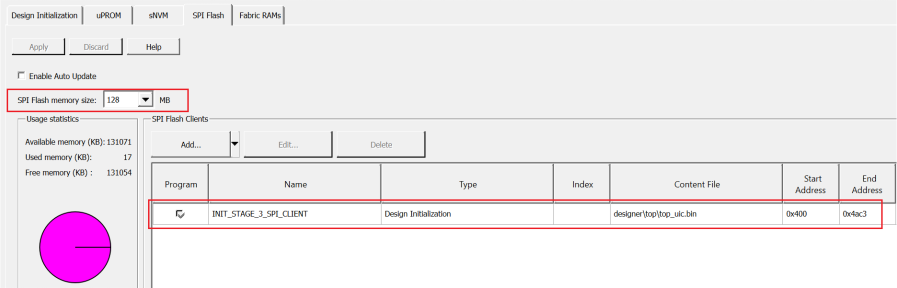
Important: For more information about design initialization, see
PolarFire Family Power-Up and Resets User Guide
.