
2.7.5 Configure Design Initialization Data and Memories
(Ask a Question)The Configure Design Initialization Data and Memories step in the Libero design flow is used to configure the TCM initialization data and storage location. User can use µPROM, sNVM, or SPI Flash as storage location based on the size of the initialization data and design requirements. In this application notes, the SPI Flash memory is used to store the TCM initialization data.
This process requires the user application executable file (HEX file) as input to initialize the TCM blocks after device power-up. The HEX file is provided with the design files. For more information about building the user application, see Building the User Application Using SoftConsole.
To generate an TCM initialization client and add it to an external SPI flash device:
- Double-click Configure Design Initialization Data and Memories on the Design Flow tab.
- On the Fabric RAMs tab, select
top/MIV_RV32_C0_0/MIV_RV32_C0_0/u_ipcore_0/gen_tcm0.u_subsys_TCM_0/tcm_ram_macro.u_ram_0from the list of logical instances, and click Edit, as shown in the following figure. Thetop/MIV_RV32_C0_0/MIV_RV32_C0_0/u_ipcore_0/gen_tcm0.u_subsys_TCM_0/tcm_ram_macro.u_ram_0instance is the MIV_RV32 processor's main memory. The System Controller initializes this instance with the imported client at power-up.Figure 2-34. Fabric RAMs Tab 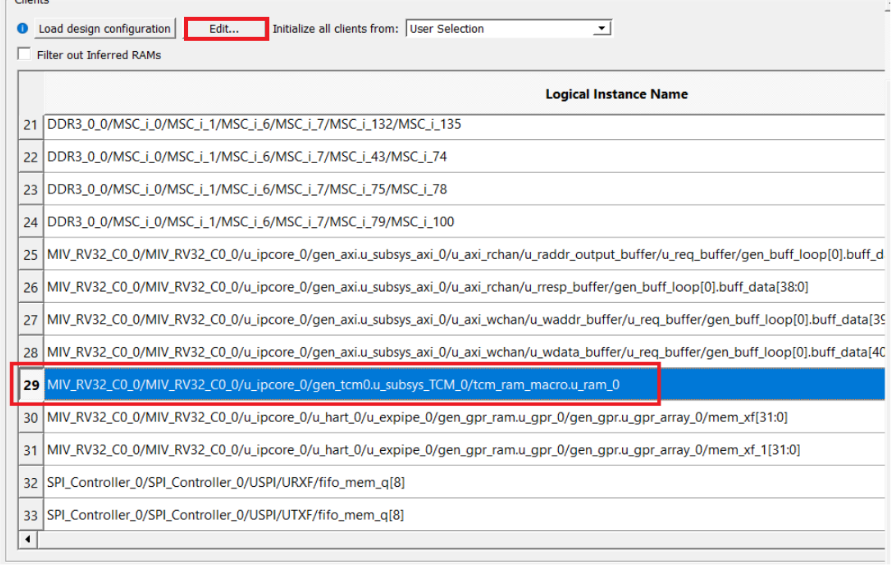
- In the Edit Fabric RAM Initialization Client dialog box, set Storage Type to SPI-Flash and click the Import button next to Content from file, as shown in the following figure.
Figure 2-35. Edit Fabric RAM Initialization Client Dialog Box 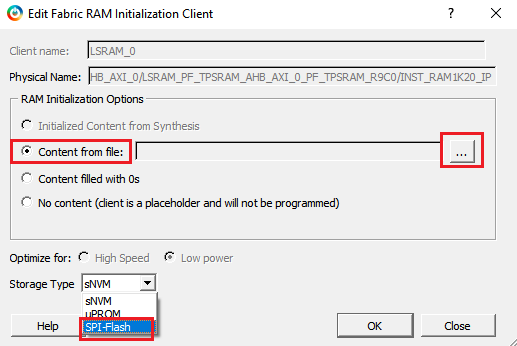
- In the Import Memory File dialog box, locate the
MiV_uart_blinky.hexfile from DesignFiles_directory\HW\src\softconsole folder. Select the Use relative path from project directory option and click Open.Figure 2-36. Import Memory File Dialog Box 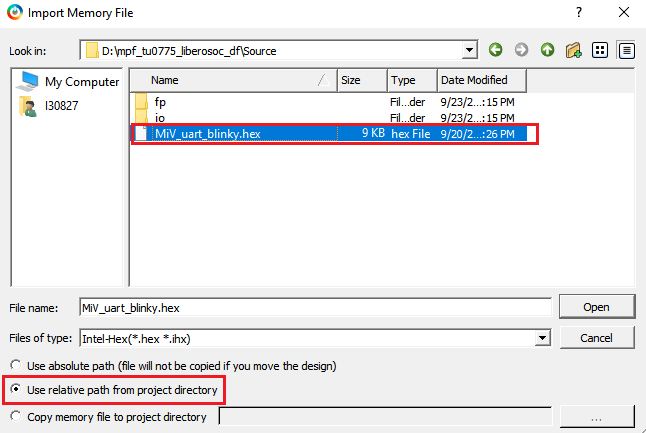
- In the Edit Fabric RAM Initialization Client window, click OK.
- On the Fabric RAMs tab, click Apply, as shown in the following figure.
Figure 2-37. Fabric RAMs Tab - Apply Button 
- In the Design Initialization tab, under Third stage (uPROM/sNVM/SPI-Flash), select the SPI-Flash - No-binding Plaintext option and ensure that the SPI Clock divider value is set to 6, as shown in the following figure. This means that the imported user application will be written to SPI-Flash without encryption and authentication.Important: The SPI Clock divider value specifies the required SPI SCK frequency to read the initialization data from SPI Flash. The SPI Clock divider value must be selected based on the external SPI Flash operating frequency range.
- Click Apply.
Figure 2-38. Design Initialization Data 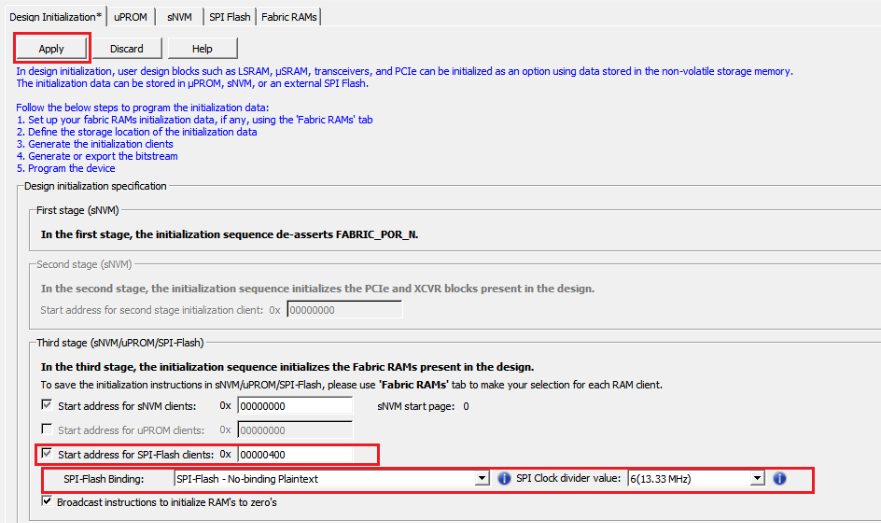
This concludes the configuring of the storage type and application file for the fabric RAMs initialization.