
2.3.9 RAM Initialization Before Place and Route
(Ask a Question)During Fabric RAM IP core creation, the content file can be imported for simulation. The path of the content file is stored and passed to the Design and Memory Initialization stage.
Follow these steps to initialize Fabric RAM using LSRAM and µSRAM configurator:
- In the PF Two-Port Large SRAM Configurator
window, select the Memory Initialization Settings tab. Then, select the Initialize
RAM at Power-up check box as shown in the following figure.
Figure 2-20. PF Two-Port Large SRAM Configurator Window 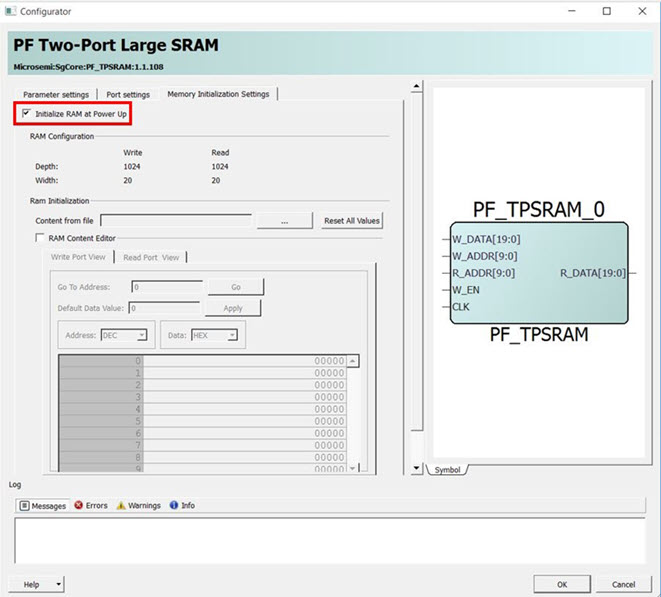
- Select the Import File option and import
the memory content file (Intel-Hex) from the Import Memory Content dialog box, as
shown in the following figure. File extensions are set to *.hex for Intel-Hex files
during import. The imported memory content is displayed in the RAM Content Editor
pane.
Figure 2-21. Import Memory Content 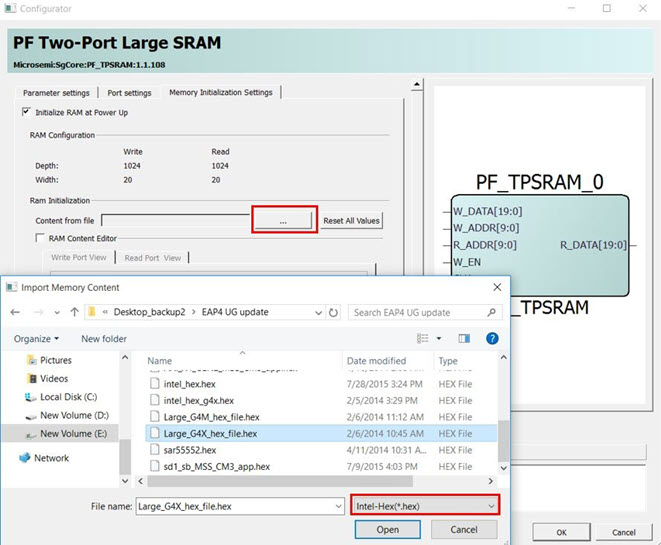
- After Place and Route, select the storage type for the content file and generate the initialization client using the procedure mentioned in How To Set Up Design and Memory Initialization.
For more information about LSRAM and µSRAM Configurators and user options, see the “Embedded Memory Blocks” section in PolarFire Family Fabric User Guide.