9.14.3 Export Programming Files (SmartFusion® Only)
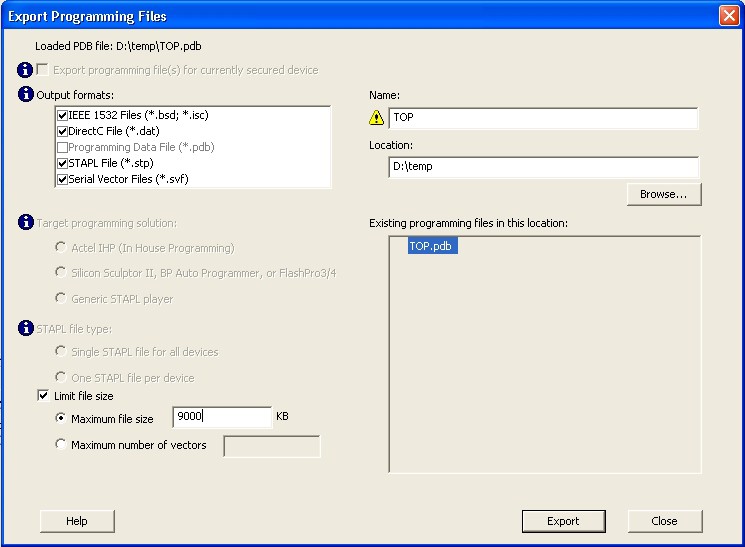
Export Programming Files enables you to export DirectC DAT, PDB and STP programming files. Exporting programming files is supported in both Chain and Single mode; to export programming files in Chain mode you must select one SmartFusion device in your chain.
To export a programming file:
- From the FlashPro File menu choose . The Export Programming Files dialog box appears.
- Specify the Output format, Name and Location and click Export to create the files.
Export programming files for currently secured device enables you to generate PDB files for devices that have already been programmed with security settings. It generates encrypted data for encrypted features.
Target Programming Solution and STAPL file type options are available only if you have serialization.
- Target Programming Solution
-
- Select Actel IHP (In House Programming) when generating STAPL or SVF files for Actel IHP.
- Select Silicon Sculptor II, BP Auto Programmer, or FlashPro4/3 when generating programming files for those programmers.
- Select Generic STAPL Player when generating STAPL files for generic STAPL players.
- STAPL File Type Options
- Single STAPL file for all devices: Generates one programming file with all the generated increment values or with values in the custom serialization file.
- One STAPL file per device: Generates one programming file for each generated increment value or for each value in the custom serialization file.
- Limit file size: Some testers may have memory size restrictions for a single SVF file. The SVF limit file option enables you to limit the size of each SVF file by either file size or vectors.
The generated SVF files append an index to the file name indicating the sequence of files. The
format is: <SVF_filename>_XXXXX.svf
where XXXXX is the index of the SVF file. The first SVF file begins with
<SVF_filename>_00000.svf and increments by 1 until file
generation is complete.
Maximum file size: Max file size limit for the SVF file; use this option to limit your SVF file size based on number of kB.
Maximum number of vectors: Max vector limit for the SVF file; use this option to limit the size of your SVF based on number of vectors.