
5.8.6 Catalog
The Catalog displays a list of available cores, HDL templates, busses, and Microchip macros (see image below).
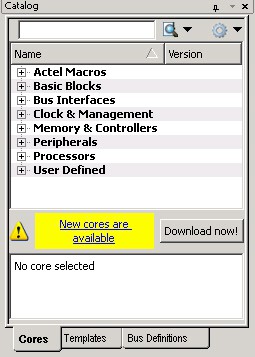
From the Catalog, you can create a component from the list of available cores, add a CoreConsole processor or peripheral, add HDL source code to your text editor with the HDL templates, add a bus interface to your SmartDesign component, or add an Microchip macro to your SmartDesign component.
Double-click a core to configure it and add it to your design. Configured cores are added to your list of Components/Modules in the Design Explorer.