
5.22.3 Adding Bus Interfaces to SmartDesign Components
To add a bus interface to a component:
- Select a bus definition from the Bus Definitions
tab in the Catalog and drag it onto your top-level. The Add
Bus Interface dialog box opens. A default name is assigned to your bus
interface; you can specify your own if you wish.
Figure 5-57. Add Bus Interface Dialog Box 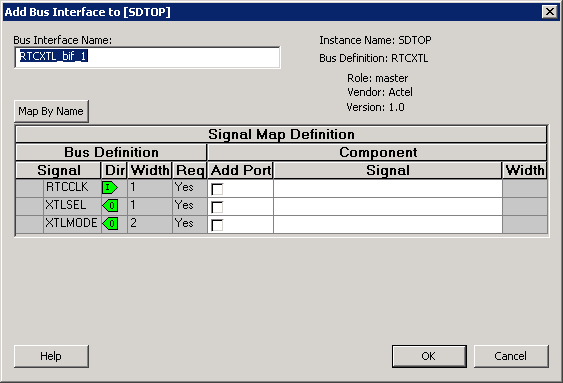
- Click Map by Name to map the signals automatically. Map By Name attempts to map any similar signal names between the bus definition and pin names on the instance.
- (Optional) Click the Add Port checkbox to add ports to the top-level. If you choose to add ports, the Signal row becomes a text editable field.