
15.6.3 Colors and Symbols
Colors and symbols differentiate the I/O and logic macros in ChipPlanner. The following table defines the default colors assigned to symbols. You can change these colors per design.
| Color | Definition |
|---|---|
| White Border | A white border denotes a selected object. |
| Black Background | A black background denotes an unused or unassigned module. |
| Blue | Blue denotes a combinatorial module. |
| Yellow | Yellow denotes locked logic modules. If the module is selected, the symbol appears yellow. If the module is unselected, the border appears yellow. |
| Green | Green denotes I/O modules. |
| Red | Red denotes clock modules. |
| Magenta | Magenta denotes sequential modules. |
 | Reserved modules that are not user definable are gray, crossed-out symbols on a black background. |
 | Clock modules are red. Unused/unassigned modules are red symbols on a black background. Used/assigned modules are black symbols on a red background. |
 | Input/Output modules are green. Unused/unassigned modules are green symbols on a
black background. Used/assigned modules are black symbols on a green background. |
 |
Combinatorial modules are blue. Unused/unassigned modules are blue symbols on a black background. Used/assigned modules are black symbols on a blue background. |
 | Sequential modules are magenta. Unused/unassigned modules are magenta symbols on a black background. Used/assigned modules are black symbols on a magenta background. |
 | Buffer modules are blue. |
 | RAM modules are green. Unused/unassigned modules are green symbols (RAM) on a black background. Used/assigned modules are black on a green background. |
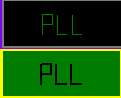 |
PLL modules are green. Unused/unassigned modules are green symbols (PLL) on a black background. Used/assigned modules are black on a green background. |
 |
I/O Inbuff modules are pink on a black background. Used/assigned modules are black on a pink background. |