
13.25.7 Importing Source Files
Source files include your netlist and constraint files.
Source files are files created by outside tools that will be tracked (audited) to better coordinate the design changes. If you wish, you may import some files as auxiliary files. Auxiliary files are not audited, but you do not have to re-compile your design after you import them.
| Source Files | File Type Extension | Family |
|---|---|---|
|
EDIF |
*.ed* |
All |
|
Verilog |
*.v |
All |
|
VHDL |
*.vhd |
All |
|
Actel ADL Netlist |
*.adl |
All, except ACT1, ACT2, ACT3 |
|
Criticality |
*.crt |
ACT1, ACT2, ACT3, MX, 1200XL, DX |
|
ProASIC Constraint File |
*.gcf |
ProASICPLUS |
|
Physical Design Constraint File |
*.pdc |
IGLOO®, ProASIC3, SmartFusion®, Fusion, and Axcelerator |
|
Synopsys Constraint File |
*.sdc |
IGLOO, ProASIC3, SmartFusion, Fusion, ProASICPLUS, ProASIC, Axcelerator, SX-S, SX-A, and eX |
|
CoreConsole Database File |
*.cdb* |
IGLOO, ProASIC3, SmartFusion and Fusion; Designer uses the CDB file to place the CoreMP7 cores and Designer blocks. |
The choice of source files is family dependent. Only supported source files are displayed in the Import Source dialog box. If you are working on a new design or if you have changed your netlist, then you must re-import your netlist into Designer.
- From the File menu, choose
Import Source Files. This displays the Import Source Files dialog
box, as shown in the figure below.
Figure 13-72. Import Source Files Dialog Box 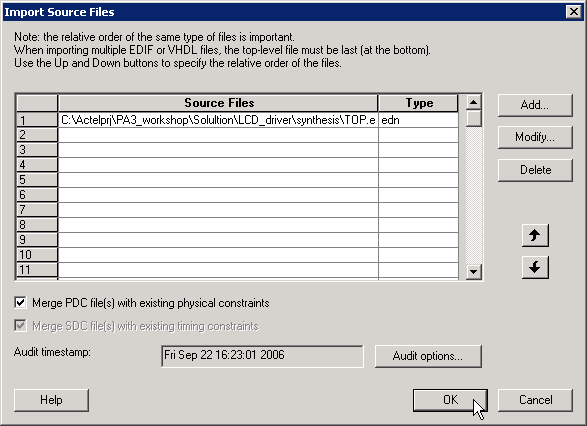
- Click Add. The Add Source Files dialog appears.
- Select the file you want to import and click Import. The File is added to the Import Source Files dialog box.
- Add more source files to the list. All files added to the Import Source Files dialog box are imported at the same time. To modify a file, select the file and click Modify. To delete a file, select the file and click Delete.
- Libero can only audit local
files. If you launch Designer from Libero, you need to copy the files locally.
Select Copy locally to copy these files to your local project
folder.Note: This button is available when design (ADB) opened by Designer is part of a Libero IDE project.
- Specifying a priority is useful if you are importing multiple netlist files, GCF files, or PDC, or SDC files. When importing multiple EDIF or structural HDL files, the top-level file must appear last in the list (at the bottom). Drag your files to specify the import order.
- (IGLOO, ProASIC3, SmartFusion, Fusion, ProASICPLUS, and Axcelerator designs only) Select Merge PDC file(s) with existing physical constraints to preserve all existing physical constraints that you have made using ChipPlanner, PinEditor, I/O Attribute Editor or a PDC file (imported previously).
- (IGLOO, ProASIC3, SmartFusion, Fusion, ProASICPLUS, and Axcelerator designs only) Select Merge SDC file(s) with existing timing constraints to preserve all the existing timing constraints already in your design, whether coming from the Timer tool or a previously imported file. If you import an SDC file and select this option, Designer merges the existing constraints and the constraints contained in the SDC file. In case of a conflict, the new constraint has priority over the existing constraint.
- To set the audit options for these source files, click Audit options and follow the directions in the Audit Options dialog box.
- When you are done adding all your
source files, click OK. Your source files are imported. Any errors appear
in the Designer log window.Note: Designer may not import file names or paths with spaces. Rename the file or path to remove the spaces, and re-import.