6.3.6.1.2 Verifying Configurations
When the user adds the “BLE OTA APP SERVICE” component, all necessary configurations are
automatically set up. The user must check the “Project Graph” window to ensure it
includes all the expected MCC configurations.
- Bluetooth® LE OTA Profile and OTA Service
components:
- Under “Over-The-Air Profile”, check Enable Server Role.
- This module generates the necessary code for the BLE OTA profile and service.
Figure 6-48. OTA Profile – Enable Server Role 
- BLE_Stack component – DFU module:
- Under “Utitlies”, check DFU module.
- This module generates the necessary code for DFU middleware to write the OTA image into embedded Flash.
Figure 6-49. BLE Stack – DFU Module Enable 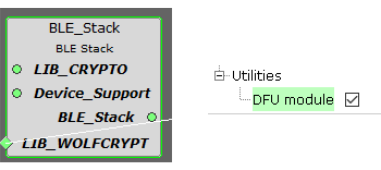
- BLE stack component – Service UUID:
- Configure advertising and scan data payload for manufacturer-specific service UUID and local name.
- BLE OTA MBD mobile application expects service UUID as 0xFEDA to filter the devices.
- Under “Advertising Data”, check Service Data.
Figure 6-50. Service UUID – FEDA 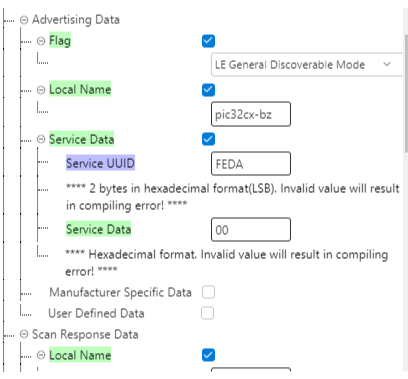
- Core component – FreeRTOS stack size:
- The OTA feature requires a minimum stack size of 3584 bytes. For example, if the user application originally needs a stack size of 1024 bytes, then set the total stack size to 1024 + 3584 = 4608 bytes. Here, we set it to 5120 bytes.
- Under RTOS Configuration, set “Stack Size (in bytes)” to 5120.
Figure 6-51. RTOS Configuration – Stack Size 
- Bootloader Services component:
- Under “Bootloader Services”, check Use Firmware Signature Verification API in Bootloader.
- This component generates the supporting linker file and MPLABX script
needed for upgradable image
.binfile generation. For more details, see Upgradable Image.binFile Generation from Related Links. Also, the system calls the crypto APIs in the bootloader section to verify the authenticity (signature verification) of the received image before performing a device reset.
Figure 6-52. Bootloader Services Component 
- APP_TIMER_SERVICE component:
- The BLE OTA procedure requires error handling and initializing the state
in case of failure in receiving the image. The system uses two software
timers based on FreeRTOS systick. The procedure uses
APP_TIMER_OTA_TIMEOUTfor error handling andAPP_TIMER_OTA_REBOOTfor resetting the device after successful image reception.
Figure 6-53. Application Timer Service Component 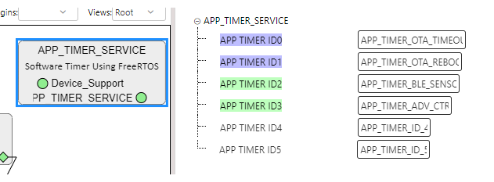
- The BLE OTA procedure requires error handling and initializing the state
in case of failure in receiving the image. The system uses two software
timers based on FreeRTOS systick. The procedure uses
- RCON component:
- As mentioned above, the
APP_TIMER_OTA_REBOOTtimer resets the device after successful image reception. The device uses software reset in the RCON module to perform the reset.
Figure 6-54. RCON Component – Use Resets 
- As mentioned above, the
- Device Information Service (DIS) component:
- The Bluetooth® SIG defines the DIS. This service can hold the firmware version. When upgrading the image, the OTAU manager gets the current running image version. The OTA server in the device can use the firmware version from DIS and send it to the OTAU manager. Using the firmware from DIS is just optional.
- Under Firmware Revision, enter “Firmware Revision” as 1.0.0.0.
Figure 6-55. Device Information Service – Firmware Revision 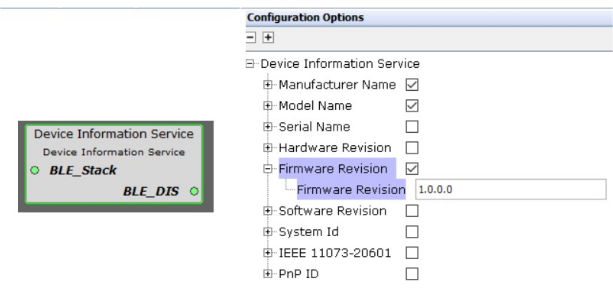
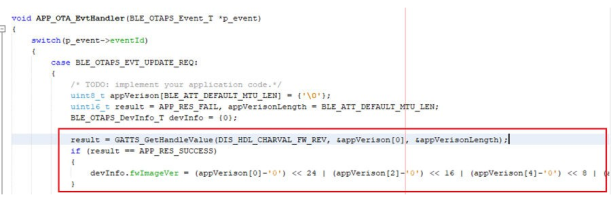
- If the customer application does not need DIS, remove the DIS component and
modify the code below for sending the firmware version.
Figure 6-56. BLE OTAPS Device Information