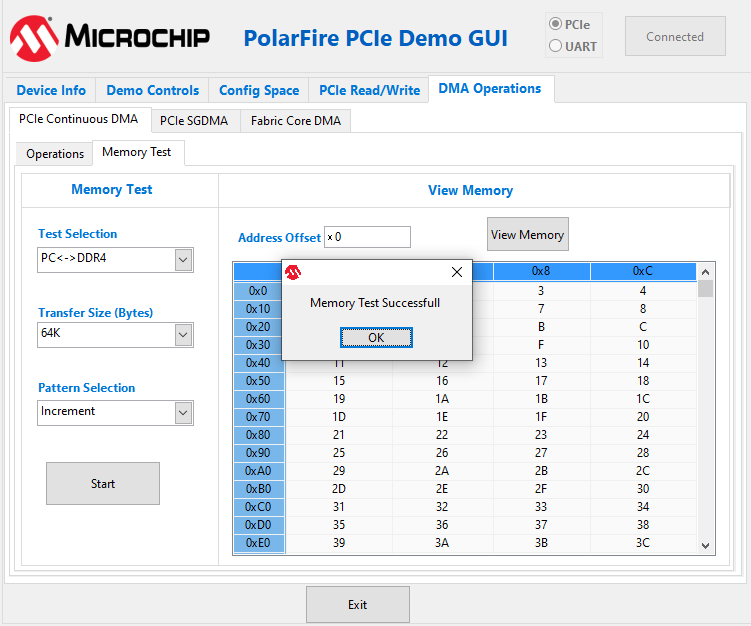
The following instructions describe running Memory Test between PC and DDR3L/DDR4/LSRAM:
Select one of the following options from the Test Selection drop-down list:
PC<->DDR3L—to transfer the data from host PC to and from PolarFire DDR3L memory
PC<->DDR4—to transfer the data from host PC to and from PolarFire DDR4 memory
PC<->LSRAM—to transfer the data from host PC to and from PolarFire LSRAM memory
Select Transfer Size (4 KB to 64 KB) from the drop-down
list.
Select Pattern
Selection from the drop-down list—Increment, Decrement, Random, Fill
with Zeros, Fill with Ones, Fill with all A’s and Fill with all 5’s.
Click Start. GUI performs the following task:
The host PC creates a buffer and initializes the memory
Initiates the PC to DDR DMA
Erases the PC buffer
Initializes the DDR to PC DMA
Compares the memory against expected memory
The following figure shows the Memory Test Successful
window.Figure 4-16. Continuous DMA Memory
Test—Memory Test Successful
Important: If memory test fails, then GUI displays the first failed memory location.
Important: Change the Offset Address and click View Memory to read the RAM memory content.
The online versions of the documents are provided as a courtesy. Verify all content and data in the device’s PDF documentation found on the device product page.